mirror of
https://github.com/gosticks/DefinitelyTyped.git
synced 2025-10-16 12:05:41 +00:00

613 lines
19 KiB
TypeScript
613 lines
19 KiB
TypeScript
// Type definitions for node-windows 0.1
|
|
// Project: https://github.com/coreybutler/node-windows
|
|
// Definitions by: Ken Human <https://github.com/kenhuman>
|
|
// Definitions: https://github.com/DefinitelyTyped/DefinitelyTyped
|
|
// TypeScript Version: 2.4
|
|
|
|
/// <reference types="node" />
|
|
|
|
import { ExecException } from 'child_process';
|
|
import { EventEmitter } from 'events';
|
|
|
|
/**
|
|
* nodewindows
|
|
* This is a standalone module, originally designed for internal use in [NGN](http://github.com/thinkfirst/NGN).
|
|
* However; it is capable of providing the same features for Node.JS scripts
|
|
* independently of NGN.
|
|
*
|
|
* ### Getting node-windows
|
|
*
|
|
* `npm install -g node-windows`
|
|
*
|
|
* ### Using node-windows
|
|
*
|
|
* `var nw = require('node-windows');`
|
|
*
|
|
* @singleton
|
|
* @author Corey Butler
|
|
*/
|
|
|
|
export interface EnvironmentPair {
|
|
name: string;
|
|
value: string;
|
|
}
|
|
|
|
export interface User {
|
|
account: string;
|
|
domain: string;
|
|
password: string;
|
|
mungeCredentialsAfterInstall?: boolean;
|
|
}
|
|
|
|
export enum LogMode {
|
|
rotate = "rotate",
|
|
reset = "reset",
|
|
roll = "roll",
|
|
append = "append"
|
|
}
|
|
|
|
export interface ServiceConfig {
|
|
name?: string;
|
|
/**
|
|
* @cfg {Array|Object} [env]
|
|
* An optional array or object used to pass environment variables to the node.js script.
|
|
* You can do this by setting environment variables in the service config, as shown below:
|
|
*
|
|
* var svc = new Service({
|
|
* name:'Hello World',
|
|
* description: 'The nodejs.org example web server.',
|
|
* script: 'C:\\path\\to\\helloworld.js',
|
|
* env: {
|
|
* name: "NODE_ENV",
|
|
* value: "production"
|
|
* }
|
|
* });
|
|
*
|
|
* You can also supply an array to set multiple environment variables:
|
|
*
|
|
* var svc = new Service({
|
|
* name:'Hello World',
|
|
* description: 'The nodejs.org example web server.',
|
|
* script: 'C:\\path\\to\\helloworld.js',
|
|
* env: [{
|
|
* name: "HOME",
|
|
* value: process.env["USERPROFILE"] // Access the user home directory
|
|
* },{
|
|
* name: "NODE_ENV",
|
|
* value: "production"
|
|
* }]
|
|
* });
|
|
*/
|
|
env?: EnvironmentPair | EnvironmentPair[];
|
|
/**
|
|
* @cfg {Number} [maxRetries=null]
|
|
* The maximum number of restart attempts to make before the service is considered non-responsive/faulty.
|
|
* Ignored by default.
|
|
*/
|
|
maxRetries?: number;
|
|
/**
|
|
* @cfg {Boolean} [stopparentfirst=false]
|
|
* Allow the service to shutdown cleanly.
|
|
*/
|
|
stopparentfirst?: boolean;
|
|
/**
|
|
* @cfg {Number} [stoptimeout=30]
|
|
* How long to wait in seconds before force killing the application.
|
|
* This only takes effect when stopparentfirst is enabled.
|
|
*/
|
|
stoptimeout?: number;
|
|
/**
|
|
* @cfg {string} [nodeOptions='--harmony']
|
|
* Options to be passed to the node process.
|
|
*/
|
|
nodeOptions?: string;
|
|
/**
|
|
* @cfg {Number} [maxRestarts=3]
|
|
* The maximum number of restarts within a 60 second period before haulting the process.
|
|
* This cannot be _disabled_, but it can be rendered ineffective by setting a value of `0`.
|
|
*/
|
|
maxRestarts?: number;
|
|
/**
|
|
* @cfg {Boolean} [abortOnError=false]
|
|
* Setting this to `true` will force the process to exit if it encounters an error that stops the node.js script from running.
|
|
* This does not mean the process will stop if the script throws an error. It will only abort if the
|
|
* script throws an error causing the process to exit (i.e. `process.exit(1)`).
|
|
*/
|
|
abortOnError?: boolean;
|
|
/**
|
|
* @cfg {Number} [wait=1]
|
|
* The initial number of seconds to wait before attempting a restart (after the script stops).
|
|
*/
|
|
wait?: number;
|
|
/**
|
|
* @cfg {Number} [grow=.25]
|
|
* A number between 0-1 representing the percentage growth rate for the #wait interval.
|
|
* Setting this to anything other than `0` allows the process to increase it's wait period
|
|
* on every restart attempt. If a process dies fatally, this will prevent the server from
|
|
* restarting the process too rapidly (and too strenuously).
|
|
*/
|
|
grow?: number;
|
|
logpath?: string;
|
|
logmode?: LogMode;
|
|
description?: string;
|
|
/**
|
|
* @cfg {String} script
|
|
* The absolute path of the script to launch as a service.
|
|
* @required
|
|
*/
|
|
script: string;
|
|
/**
|
|
* @cfg {String} execPath
|
|
* The absolute path to the executable that will launch the script.
|
|
* If omitted process.execPath is used.
|
|
*/
|
|
execPath?: string;
|
|
}
|
|
|
|
/**
|
|
* nodewindows.Service
|
|
* This utility can be used to manage node.js scripts as Windows services.
|
|
*
|
|
* **Please note that like all Windows services, creating one requires administrative privileges**.
|
|
*
|
|
* To create a service with node-windows, prepare a script like:
|
|
*
|
|
* var Service = require('node-windows').Service;
|
|
*
|
|
* // Create a new service object
|
|
* var svc = new Service({
|
|
* name:'Hello World',
|
|
* description: 'The nodejs.org example web server.',
|
|
* script: 'C:\\path\\to\\helloworld.js')
|
|
* });
|
|
*
|
|
* // Listen for the "install" event, which indicates the
|
|
* // process is available as a service.
|
|
* svc.on('install',function(){
|
|
* svc.start();
|
|
* });
|
|
*
|
|
* svc.install();
|
|
*
|
|
* The code above creates a new `Service` object, providing a pretty name and description.
|
|
* The `script` attribute identifies the Node.js script that should run as a service. Upon running
|
|
* this, the script will be visible from the Windows Services utility.
|
|
*
|
|
* 
|
|
*/
|
|
export class Service extends EventEmitter {
|
|
/**
|
|
* {String} root
|
|
* The root directory where the process files are stored.
|
|
*/
|
|
root: string;
|
|
/**
|
|
* {Object} [user]
|
|
* If you need to specify a specific user or particular credentials to manage a service, the following
|
|
* attributes may be helpful.
|
|
*
|
|
* The `user` attribute is an object with three keys: `domain`,`account`, and `password`.
|
|
* This can be used to identify which user the service library should use to perform system commands.
|
|
* By default, the domain is set to the local computer name, but it can be overridden with an Active Directory
|
|
* or LDAP domain. For example:
|
|
*
|
|
* **app.js**
|
|
*
|
|
* var Service = require('node-windows').Service;
|
|
*
|
|
* // Create a new service object
|
|
* var svc = new Service({
|
|
* name:'Hello World',
|
|
* script: require('path').join(__dirname,'helloworld.js')
|
|
* });
|
|
*
|
|
* svc.user.domain = 'mydomain.local';
|
|
* svc.user.account = 'username';
|
|
* svc.user.password = 'password';
|
|
* ...
|
|
*
|
|
* Both the account and password must be explicitly defined if you want the service module to
|
|
* run commands as a specific user. By default, it will run using the user account that launched
|
|
* the process (i.e. who launched `node app.js`).
|
|
*/
|
|
user: User;
|
|
/**
|
|
* {Object} [logOnAs]
|
|
* If you need to specify a specific user or particular credentials for the service log on as once installed, the following
|
|
* attributes may be helpful.
|
|
*
|
|
* The `logOnAs` attribute is an object with four keys: `domain`,`account`, `password`, and `mungeCredentialsAfterInstall`.
|
|
* This can be used to identify which user the service should run as once installed.
|
|
*
|
|
* If no account and password is specified, the logOnAs property is not used and the service will run as the "Local System" account.
|
|
* If account and password is specified, but domain is not specified then the domain is set to the local computer name, but it can be overridden with an Active Directory
|
|
* or LDAP domain. For example:
|
|
*
|
|
* **app.js**
|
|
*
|
|
* var Service = require('node-windows').Service;
|
|
*
|
|
* // Create a new service object
|
|
* var svc = new Service({
|
|
* name:'Hello World',
|
|
* script: require('path').join(__dirname,'helloworld.js')
|
|
* });
|
|
*
|
|
* svc.logOnAs.domain = 'mydomain.local';
|
|
* svc.logOnAs.account = 'username';
|
|
* svc.logOnAs.password = 'password';
|
|
* ...
|
|
*
|
|
* Both the account and password must be explicitly defined if you want the service to log on as that user,
|
|
* otherwise the Local System account will be used.
|
|
*/
|
|
logOnAs: User;
|
|
/**
|
|
* {String} [workingdirectory]
|
|
* The full path to the working directory that the service process
|
|
* should launch from. If this is omitted, it will default to the
|
|
* current processes working directory.
|
|
*/
|
|
workingdirectory: string;
|
|
/**
|
|
* {Boolean} exists
|
|
* Determine whether the service exists.
|
|
*/
|
|
exists: boolean;
|
|
constructor(config: ServiceConfig);
|
|
/**
|
|
* install
|
|
* Install the script as a process.
|
|
* @param [dir=root of script]
|
|
* The directory where the process files will be saved. Defaults to #script path.
|
|
* @param [callback]
|
|
* The callback to fire when the installation completes.
|
|
*/
|
|
/**
|
|
* @event install
|
|
* Fired when the installation process is complete.
|
|
*/
|
|
/**
|
|
* @event alreadyinstalled
|
|
* Fired if the script is already known to be a service.
|
|
*/
|
|
/**
|
|
* @event invalidinstallation
|
|
* Fired if an installation is detected but missing required files.
|
|
*/
|
|
/**
|
|
* @event error
|
|
* Fired in some instances when an error occurs.
|
|
*/
|
|
install(dir?: string): void;
|
|
/**
|
|
* uninstall
|
|
* Uninstall the service.
|
|
* @param [waitTime]
|
|
* Seconds to wait until winsw.exe finish processing the uninstall command.
|
|
*
|
|
* var Service = require('node-windows').Service;
|
|
*
|
|
* // Create a new service object
|
|
* var svc = new Service({
|
|
* name:'Hello World',
|
|
* script: require('path').join(__dirname,'helloworld.js')
|
|
* });
|
|
*
|
|
* // Listen for the "uninstall" event so we know when it's done.
|
|
* svc.on('uninstall',function(){
|
|
* console.log('Uninstall complete.');
|
|
* console.log('The service exists: ',svc.exists);
|
|
* });
|
|
*
|
|
* // Uninstall the service.
|
|
* svc.uninstall();
|
|
*/
|
|
/**
|
|
* @event uninstall
|
|
* Fired when the uninstall is complete.
|
|
*/
|
|
/**
|
|
* @event alreadyuninstalled
|
|
* Fired if the script is unknown as a service.
|
|
*/
|
|
uninstall(waitTime?: number): void;
|
|
/**
|
|
* start
|
|
* Start an existing method.
|
|
*/
|
|
/**
|
|
* @event start
|
|
* Fired when the event has started.
|
|
*/
|
|
start(): void;
|
|
/**
|
|
* stop
|
|
* Stop the service.
|
|
*/
|
|
/**
|
|
* @event stop
|
|
* Fired when the service is stopped.
|
|
*/
|
|
stop(): void;
|
|
/**
|
|
* restart
|
|
* Restart an existing service
|
|
*/
|
|
restart(): void;
|
|
}
|
|
|
|
export interface EventLogConfig {
|
|
source?: string;
|
|
eventLog?: string;
|
|
}
|
|
|
|
/**
|
|
* nodewindows.EventLogger
|
|
* @since 0.1.0
|
|
* Use a _non-C++_ based event logging utility with your Windows code.
|
|
* This utility can write to the event log, making your logs visible from the Event Viewer.
|
|
*
|
|
* To create a logger:
|
|
*
|
|
* var EventLogger = require('node-windows').EventLogger;
|
|
*
|
|
* var log = new EventLogger('Hello World');
|
|
*
|
|
* log.info('Basic information.');
|
|
* log.warn('Watch out!');
|
|
* log.error('Something went wrong.');
|
|
*
|
|
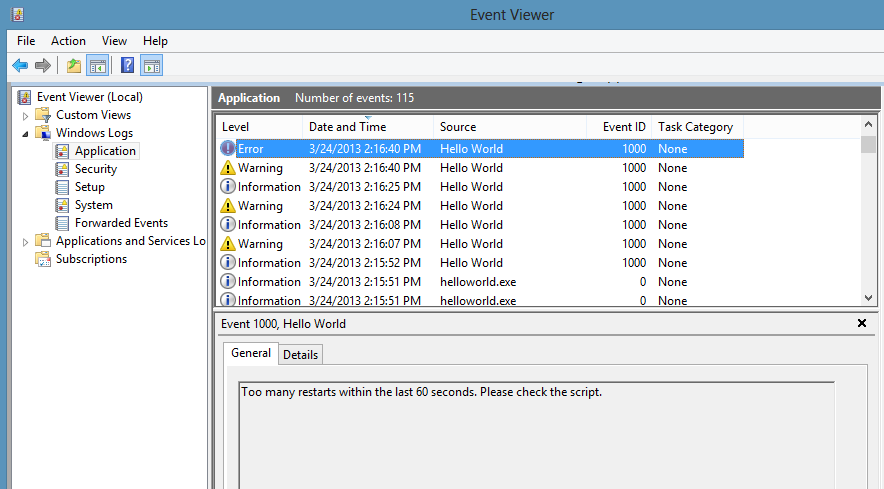
* Looks similar to:
|
|
*
|
|
* 
|
|
*
|
|
* Some lesser-used options are also available through node-windows event logging.
|
|
*
|
|
* log.auditSuccess('AUser Login Success');
|
|
* log.auditFailure('AUser Login Failure');
|
|
*
|
|
* Each log type (info, warn, error, auditSuccess, and auditFailure) method optionally accepts two additional
|
|
* arguments, including a _code_ and _callback_. By default, the event code is `1000` if not otherwise specified.
|
|
* To provide a custom event code with a log message and write that message to the console, the following code could
|
|
* be used:
|
|
*
|
|
* log.info('Something different happened!', 1002, function(){
|
|
* console.log('Something different happened!');
|
|
* });
|
|
*
|
|
* By default, event logs are all part of the `APPLICATION` scope. However; it is also possible to use the `SYSTEM` log.
|
|
* To do this, a configuration object must be passed to the new log:
|
|
*
|
|
* var EventLogger = require('node-windows').EventLogger;
|
|
* var log = new EventLogger({
|
|
* source: 'My Event Log',
|
|
* eventLog: 'SYSTEM'
|
|
* });
|
|
*/
|
|
export class EventLogger {
|
|
/**
|
|
* @cfg {String} [name=Node.js]
|
|
* The source of the log information. This is commonly the title of an application
|
|
* or the Node.js script name (i.e. MyApp).
|
|
*/
|
|
source: string;
|
|
|
|
/**
|
|
* @cfg {String} [eventLog=APPLICATION]
|
|
* The event log where messages should be written. This is either `APPLICATION` or `SYSTEM`.
|
|
*/
|
|
eventLog: string;
|
|
|
|
constructor(config?: EventLogConfig);
|
|
|
|
/**
|
|
* info
|
|
* Log an informational message.
|
|
* @param message
|
|
* The content of the log message.
|
|
* @param [code=1000]
|
|
* The event code to assign to the message.
|
|
* @param [callback]
|
|
* An optional callback to run when the message is logged.
|
|
*/
|
|
info(
|
|
message: string,
|
|
code?: number,
|
|
callback?: (error: ExecException, stdout: Buffer, stderr: Buffer) => void
|
|
): void;
|
|
|
|
/**
|
|
* info
|
|
* Log an informational message.
|
|
* @param message
|
|
* The content of the log message.
|
|
* @param [code=1000]
|
|
* The event code to assign to the message.
|
|
* @param [callback]
|
|
* An optional callback to run when the message is logged.
|
|
*/
|
|
information(
|
|
message: string,
|
|
code?: number,
|
|
callback?: (error: ExecException, stdout: Buffer, stderr: Buffer) => void
|
|
): void;
|
|
|
|
/**
|
|
* error
|
|
* Log an error message.
|
|
* @param message
|
|
* The content of the log message.
|
|
* @param [code=1000]
|
|
* The event code to assign to the message.
|
|
* @param [callback]
|
|
* An optional callback to run when the message is logged.
|
|
*/
|
|
error(
|
|
message: string,
|
|
code?: number,
|
|
callback?: (error: ExecException, stdout: Buffer, stderr: Buffer) => void
|
|
): void;
|
|
|
|
/**
|
|
* warn
|
|
* Log a warning message.
|
|
* @param message
|
|
* The content of the log message.
|
|
* @param [code=1000]
|
|
* The event code to assign to the message.
|
|
* @param [callback]
|
|
* An optional callback to run when the message is logged.
|
|
*/
|
|
warn(
|
|
message: string,
|
|
code?: number,
|
|
callback?: (error: ExecException, stdout: Buffer, stderr: Buffer) => void
|
|
): void;
|
|
|
|
/**
|
|
* warn
|
|
* Log a warning message.
|
|
* @param message
|
|
* The content of the log message.
|
|
* @param [code=1000]
|
|
* The event code to assign to the message.
|
|
* @param [callback]
|
|
* An optional callback to run when the message is logged.
|
|
*/
|
|
warning(
|
|
message: string,
|
|
code?: number,
|
|
callback?: (error: ExecException, stdout: Buffer, stderr: Buffer) => void
|
|
): void;
|
|
|
|
/**
|
|
* auditSuccess
|
|
* Log an audit success message.
|
|
* @param message
|
|
* The content of the log message.
|
|
* @param [code=1000]
|
|
* The event code to assign to the message.
|
|
* @param [callback]
|
|
* An optional callback to run when the message is logged.
|
|
*/
|
|
auditSuccess(
|
|
message: string,
|
|
code?: number,
|
|
callback?: (error: ExecException, stdout: Buffer, stderr: Buffer) => void
|
|
): void;
|
|
|
|
/**
|
|
* auditFailure
|
|
* Log an audit failure message.
|
|
* @param message
|
|
* The content of the log message.
|
|
* @param [code=1000]
|
|
* The event code to assign to the message.
|
|
* @param [callback]
|
|
* An optional callback to run when the message is logged.
|
|
*/
|
|
auditFailure(
|
|
message: string,
|
|
code?: number,
|
|
callback?: (error: ExecException, stdout: Buffer, stderr: Buffer) => void
|
|
): void;
|
|
}
|
|
|
|
/**
|
|
* isAdminUser
|
|
* nodewindows
|
|
* This asynchronous command determines whether the current user has administrative privileges.
|
|
* It passes a boolean value to the callback, returning `true` if the user is an administrator
|
|
* or `false` if it is not.
|
|
* @param callback
|
|
* @param callback.isAdmin
|
|
* Receives true/false as an argument to the callback.
|
|
*/
|
|
export function isAdminUser(callback: (isAdmin: boolean) => void): void;
|
|
|
|
/**
|
|
* kill
|
|
* nodewindows
|
|
* Kill a specific process
|
|
* @param PID
|
|
* Process ID
|
|
* @param [force=false]
|
|
* Force close the process.
|
|
* @param [callback]
|
|
*/
|
|
export function kill(pid: number, force?: boolean, callback?: () => void): void;
|
|
|
|
/**
|
|
* list
|
|
* nodewindows
|
|
* List the processes running on the server.
|
|
* @param callback
|
|
* Receives the process object as the only callback argument
|
|
* @param [verbose=false]
|
|
*/
|
|
export function list(callback: (proc: any) => void, verbose?: boolean): void;
|
|
|
|
/**
|
|
* elevate
|
|
* nodewindows
|
|
* Elevate is similar to `sudo` on Linux/Mac. It attempts to elevate the privileges of the
|
|
* current user to a local administrator. Using this does not require a password, but it
|
|
* does require that the current user have administrative privileges. Without these
|
|
* privileges, the command will fail with a `access denied` error.
|
|
*
|
|
* On systems with UAC enabled, this may prompt the user for permission to proceed:
|
|
*
|
|
* 
|
|
*
|
|
* **Syntax**:
|
|
*
|
|
* `elevate(cmd[,options,callback])`
|
|
*
|
|
* @param cmd
|
|
* The command to execute with elevated privileges. This can be any string that would be typed at the command line.
|
|
* @param [options]
|
|
* Any options that will be passed to `require('child_process').exec(cmd,<OPTIONS>,callback)`.
|
|
* @param callback
|
|
* The callback function passed to `require('child_process').exec(cmd,options,<CALLBACK>)`.
|
|
*/
|
|
export function elevate(cmd: string, options: any, callback: () => void): void;
|
|
|
|
/**
|
|
* sudo
|
|
* nodewindows
|
|
* Sudo acts similarly to `sudo` on Linux/Mac. Unlike _elevate_, it requires a password, but it
|
|
* will not prompt the user for permission to proceed. Like _elevate_, this
|
|
* _still requires administrative privileges_ for the user, otherwise the command will fail.
|
|
* The primary difference between this and _elevate()_ is the prompt.
|
|
*
|
|
* **Syntax**:
|
|
*
|
|
* `sudo(cmd,password[,options,callback])`
|
|
*
|
|
* @param cmd
|
|
* The command to execute with elevated privileges. This can be any string that would be typed at the command line.
|
|
* @param password
|
|
* The password of the user
|
|
* @param [options]
|
|
* Any options that will be passed to `require('child_process').exec(cmd,<OPTIONS>,callback)`.
|
|
* @param [callback]
|
|
* The callback function passed to `require('child_process').exec(cmd,options,<CALLBACK>)`.
|
|
*/
|
|
export function sudo(cmd: string, password: string, options: any, callback: () => void): void;
|
|
|
|
export interface WinswConfig {
|
|
id: string;
|
|
name: string;
|
|
script: string;
|
|
description?: string;
|
|
nodeOptions?: string | string[];
|
|
wrapperArgs: string;
|
|
logmode: LogMode;
|
|
logpath: string;
|
|
dependencies: string | string[];
|
|
env: EnvironmentPair | EnvironmentPair[];
|
|
logOnAs: User;
|
|
workingdirectory: string;
|
|
}
|