mirror of
https://github.com/gosticks/react-table.git
synced 2026-08-19 16:30:21 +00:00
Compare commits
| Author | SHA1 | Date | |
|---|---|---|---|
 Tanner Linsley Tanner Linsley
|
379d9e11d5 | ||
|
John MaguireandTanner Linsley
|
3fff682578 |
+73
-94
@@ -1,80 +1,59 @@
|
||||
## 6.10.3
|
||||
|
||||
- Further improve `normalizeComponent` function
|
||||
|
||||
## 6.10.2
|
||||
|
||||
- Fixed regression found in `normalizeComponent` function fix
|
||||
|
||||
## 6.10.1
|
||||
|
||||
- Fixed issues with `normalizeComponent` function
|
||||
|
||||
## 6.10.0
|
||||
|
||||
- Rebased volatile commits out of 6.9.0
|
||||
- Merged (hopefully) non-breaking fixes after rebasing and reverting.
|
||||
|
||||
## 6.9.0
|
||||
|
||||
This version has been reverted due to some major bugs that were introduced with it.
|
||||
|
||||
## 6.8.6
|
||||
|
||||
#### Fixes & Optimizations
|
||||
|
||||
- Since `resolveData` is now capable of materializing data on it's own, the `data` prop is no longer required as a prop-type.
|
||||
* Since `resolveData` is now capable of materializing data on it's own, the `data` prop is no longer required as a prop-type.
|
||||
|
||||
## 6.8.4
|
||||
|
||||
#### Fixes & Optimizations
|
||||
|
||||
- Only run `resolveData` prop when `data` prop has changed, not any others.
|
||||
* Only run `resolveData` prop when `data` prop has changed, not any others.
|
||||
|
||||
## 6.8.3
|
||||
|
||||
#### Fixes & Optimizations
|
||||
|
||||
- Allow the `resolveData` prop to alter or materialize new data when the `data` prop changes.
|
||||
* Allow the `resolveData` prop to alter or materialize new data when the `data` prop changes.
|
||||
|
||||
## 6.8.1
|
||||
|
||||
#### Fixes & Optimizations
|
||||
|
||||
- Updated eslint and code formatting
|
||||
* Updated eslint and code formatting
|
||||
|
||||
## 6.7.5
|
||||
|
||||
#### Fixes & Optimizations
|
||||
|
||||
- Now passes `column` to `getResizerProps` (#667)
|
||||
- NOTE: `getResizerProps` is now only called if the column is resizable
|
||||
- Fixes the `className` ordering in defaultProps for ThComponent (#673)
|
||||
- NOTE: user supplied classNames now come at the end so they can extend the defaults
|
||||
* Now passes `column` to `getResizerProps` (#667)
|
||||
* NOTE: `getResizerProps` is now only called if the column is resizable
|
||||
* Fixes the `className` ordering in defaultProps for ThComponent (#673)
|
||||
* NOTE: user supplied classNames now come at the end so they can extend the defaults
|
||||
|
||||
## 6.7.4
|
||||
|
||||
#### Fixes & Optimizations
|
||||
|
||||
- Fix Prop types for columns
|
||||
* Fix Prop types for columns
|
||||
|
||||
## 6.7.3
|
||||
|
||||
#### Fixes & Optimizations
|
||||
|
||||
- Fix the rest of the proptypes
|
||||
* Fix the rest of the proptypes
|
||||
|
||||
## 6.7.2
|
||||
|
||||
#### Fixes & Optimizations
|
||||
|
||||
- `getPropTypes` proptype check
|
||||
* `getPropTypes` proptype check
|
||||
|
||||
## 6.7.1
|
||||
|
||||
#### Fixes & Optimizations
|
||||
|
||||
- `eslint-config` moved to dev deps
|
||||
* `eslint-config` moved to dev deps
|
||||
|
||||
## 6.7.0
|
||||
|
||||
@@ -82,113 +61,113 @@ This version has been reverted due to some major bugs that were introduced with
|
||||
|
||||
#### New Features
|
||||
|
||||
- Expose page/pageSize to rows/cells
|
||||
- Supply sort direction to custom sort methods
|
||||
* Expose page/pageSize to rows/cells
|
||||
* Supply sort direction to custom sort methods
|
||||
|
||||
#### Fixes & Optimizations
|
||||
|
||||
- README updates
|
||||
- Linter cleanup
|
||||
- Added PropTypes node module
|
||||
- Deps, linting and style upgrades
|
||||
* README updates
|
||||
* Linter cleanup
|
||||
* Added PropTypes node module
|
||||
* Deps, linting and style upgrades
|
||||
|
||||
## 6.6.0
|
||||
|
||||
#### Fixes & Optimizations
|
||||
|
||||
- moved repo to react-tools
|
||||
- Doc examples moved to codesandbox.io
|
||||
- README updates
|
||||
- CSS refacting for rt-tfoot to match rt-thead
|
||||
- CSS more specific for input and select
|
||||
* moved repo to react-tools
|
||||
* Doc examples moved to codesandbox.io
|
||||
* README updates
|
||||
* CSS refacting for rt-tfoot to match rt-thead
|
||||
* CSS more specific for input and select
|
||||
|
||||
## 6.5.3
|
||||
|
||||
#### Fixes & Optimizations
|
||||
|
||||
- `onClick` proxying and eslint
|
||||
* `onClick` proxying and eslint
|
||||
|
||||
## 6.5.2
|
||||
|
||||
#### New Features
|
||||
|
||||
- Provide onClick handleOriginal function - #406
|
||||
* Provide onClick handleOriginal function - #406
|
||||
|
||||
#### Fixes & Optimizations
|
||||
|
||||
- README updates
|
||||
- `makePathArray` in utils - #326
|
||||
- Various fixes: #294, #376, #398, #415,
|
||||
* README updates
|
||||
* `makePathArray` in utils - #326
|
||||
* Various fixes: #294, #376, #398, #415,
|
||||
|
||||
## 6.5.1
|
||||
|
||||
#### Fixes & Optimizations
|
||||
|
||||
- `defaultExpanded` now works correctly - #372
|
||||
- `column.getProps().rest` props are now applied correctly
|
||||
- `makeTemplateComponent` now supports `displayName` - #289
|
||||
* `defaultExpanded` now works correctly - #372
|
||||
* `column.getProps().rest` props are now applied correctly
|
||||
* `makeTemplateComponent` now supports `displayName` - #289
|
||||
|
||||
## 6.5.0
|
||||
|
||||
##### New Features
|
||||
|
||||
- `column.filterAll` - defaults to `false`, but when set to `true` will provide the entire array of rows to `filterMethod` as opposed to one row at a time. This allows for more fine-grained filtering using any method you can dream up. See the [Custom Filtering example](https://react-table.js.org/#/story/custom-filtering) for more info.
|
||||
* `column.filterAll` - defaults to `false`, but when set to `true` will provide the entire array of rows to `filterMethod` as opposed to one row at a time. This allows for more fine-grained filtering using any method you can dream up. See the [Custom Filtering example](https://react-table.js.org/#/story/custom-filtering) for more info.
|
||||
|
||||
## 6.4.0
|
||||
|
||||
##### New Features
|
||||
|
||||
- `PadRowComponent` - the content rendered inside of a padding row. Defaults to a react component that renders ` `
|
||||
* `PadRowComponent` - the content rendered inside of a padding row. Defaults to a react component that renders ` `
|
||||
|
||||
## 6.3.0
|
||||
|
||||
##### New Features
|
||||
|
||||
- `defaultSortDesc` - allows you to set the default sorting direction for all columns to descending.
|
||||
- `column.defaultSortDesc` - allows you to set the default sorting direction for a specific column. Falls back to the global `defaultSortDesc` when not set at all.
|
||||
* `defaultSortDesc` - allows you to set the default sorting direction for all columns to descending.
|
||||
* `column.defaultSortDesc` - allows you to set the default sorting direction for a specific column. Falls back to the global `defaultSortDesc` when not set at all.
|
||||
|
||||
## 6.0.0
|
||||
|
||||
##### New Features
|
||||
|
||||
- New Renderers:
|
||||
- `Aggregated` - Custom renderer for aggregated cells
|
||||
- `Pivot` - Custom renderer for Pivoted Cells (utilizes `Expander` and `PivotValue`)
|
||||
- `PivotValue` - Custom renderer for Pivot cell values (deprecates the undocumented `pivotRender` option)
|
||||
- `Expander` - Custom renderer for Pivot cell Expander
|
||||
- Added custom sorting methods per table via `defaultSortMethod` and per column via `column.sortMethod`
|
||||
- Pivot columns are now visibly separate and sorted/filtered independently.
|
||||
- Added `column.resizable` to override global table `resizable` option for specific columns.
|
||||
- Added `column.sortable` to override global table `sortable` option for specific columns.
|
||||
- Added `column.filterable` to override global table `filterable` option for specific columns.
|
||||
- Added `defaultExpanded` table option.
|
||||
- All callbacks can now be utilized without needing to hoist and manage the piece of state they export. That is what their prop counterparts are for, so now the corresponding prop is used instead of the callback to detect a "fully controlled" state.
|
||||
- Prevent transitions while column resizing for a smoother resize effect.
|
||||
- Disable text selection while resizing columns.
|
||||
* New Renderers:
|
||||
* `Aggregated` - Custom renderer for aggregated cells
|
||||
* `Pivot` - Custom renderer for Pivoted Cells (utilizes `Expander` and `PivotValue`)
|
||||
* `PivotValue` - Custom renderer for Pivot cell values (deprecates the undocumented `pivotRender` option)
|
||||
* `Expander` - Custom renderer for Pivot cell Expander
|
||||
* Added custom sorting methods per table via `defaultSortMethod` and per column via `column.sortMethod`
|
||||
* Pivot columns are now visibly separate and sorted/filtered independently.
|
||||
* Added `column.resizable` to override global table `resizable` option for specific columns.
|
||||
* Added `column.sortable` to override global table `sortable` option for specific columns.
|
||||
* Added `column.filterable` to override global table `filterable` option for specific columns.
|
||||
* Added `defaultExpanded` table option.
|
||||
* All callbacks can now be utilized without needing to hoist and manage the piece of state they export. That is what their prop counterparts are for, so now the corresponding prop is used instead of the callback to detect a "fully controlled" state.
|
||||
* Prevent transitions while column resizing for a smoother resize effect.
|
||||
* Disable text selection while resizing columns.
|
||||
|
||||
##### Breaking API Changes
|
||||
|
||||
- New Renderers:
|
||||
- `Cell` - deprecates and replaces `render`
|
||||
- `Header` - deprecates and replaces `header`
|
||||
- `Footer` - deprecates and replaces `footer`
|
||||
- `Filter`- deprecates and replaces `filterRender`
|
||||
- Callbacks now provide the destination state as the primary parameter(s). This makes hoisting and controlling the state in redux or component state much easier. eg.
|
||||
- `onSorting` no longer requires you to build your own toggle logic
|
||||
- `onResize` no longer requires you to build your own resize logic
|
||||
- Renamed `onChange` callback -> `onFetchData` which will always fire when a new data model needs to be fetched (or if not using `manual`, when new data is materialized internally).
|
||||
- Renamed `filtering` -> `filtered`
|
||||
- Renamed `sorting` -> `sorted`
|
||||
- Renamed `expandedRows` -> `expanded`
|
||||
- Renamed `resizing` -> `resized`
|
||||
- Renamed `defaultResizing` -> `defaultResized`
|
||||
- Renamed `defaultFiltering` -> `defaultFiltered`
|
||||
- Renamed `defaultSorting` -> `defaultSorted`
|
||||
- Renamed `onSortingChange` -> `onSortedChange`
|
||||
- Renamed `onFilteringChange` -> `onFilteredChange`
|
||||
- Renamed `onResize` -> `onResizedChange`
|
||||
- Renamed `onExpandRow` -> `onExpandedChange`
|
||||
- Renamed `showFilters` -> `filterable`
|
||||
- Renamed `hideFilter` -> `filterable` (Column option. Note the true/false value is now flipped.)
|
||||
- `cellInfo.row` and `rowInfo.row` now reference the materialize data for the table. To reference the original row, use `cellInfo.original` and `rowInfo.original`
|
||||
- Removed `pivotRender` column option. You can now control how the value is displayed by overriding the `PivotValueComponent` or the individual column's `PivotValue` renderer. See [Pivoting Options Story](https://react-table.js.org/?selectedKind=2.%20Demos&selectedStory=Pivoting%20Options&full=0&down=1&left=1&panelRight=0&downPanel=kadirahq%2Fstorybook-addon-actions%2Factions-panel) for a reference on how to customize pivot column rendering.
|
||||
* New Renderers:
|
||||
* `Cell` - deprecates and replaces `render`
|
||||
* `Header` - deprecates and replaces `header`
|
||||
* `Footer` - deprecates and replaces `footer`
|
||||
* `Filter`- deprecates and replaces `filterRender`
|
||||
* Callbacks now provide the destination state as the primary parameter(s). This makes hoisting and controlling the state in redux or component state much easier. eg.
|
||||
* `onSorting` no longer requires you to build your own toggle logic
|
||||
* `onResize` no longer requires you to build your own resize logic
|
||||
* Renamed `onChange` callback -> `onFetchData` which will always fire when a new data model needs to be fetched (or if not using `manual`, when new data is materialized internally).
|
||||
* Renamed `filtering` -> `filtered`
|
||||
* Renamed `sorting` -> `sorted`
|
||||
* Renamed `expandedRows` -> `expanded`
|
||||
* Renamed `resizing` -> `resized`
|
||||
* Renamed `defaultResizing` -> `defaultResized`
|
||||
* Renamed `defaultFiltering` -> `defaultFiltered`
|
||||
* Renamed `defaultSorting` -> `defaultSorted`
|
||||
* Renamed `onSortingChange` -> `onSortedChange`
|
||||
* Renamed `onFilteringChange` -> `onFilteredChange`
|
||||
* Renamed `onResize` -> `onResizedChange`
|
||||
* Renamed `onExpandRow` -> `onExpandedChange`
|
||||
* Renamed `showFilters` -> `filterable`
|
||||
* Renamed `hideFilter` -> `filterable` (Column option. Note the true/false value is now flipped.)
|
||||
* `cellInfo.row` and `rowInfo.row` now reference the materialize data for the table. To reference the original row, use `cellInfo.original` and `rowInfo.original`
|
||||
* Removed `pivotRender` column option. You can now control how the value is displayed by overriding the `PivotValueComponent` or the individual column's `PivotValue` renderer. See [Pivoting Options Story](https://react-table.js.org/?selectedKind=2.%20Demos&selectedStory=Pivoting%20Options&full=0&down=1&left=1&panelRight=0&downPanel=kadirahq%2Fstorybook-addon-actions%2Factions-panel) for a reference on how to customize pivot column rendering.
|
||||
|
||||
@@ -6,8 +6,8 @@
|
||||
|
||||
`react-table` is a **lightweight, fast and extendable datagrid** built for React
|
||||
|
||||
<a href="https://travis-ci.org/tannerlinsley/react-table" target="\_parent">
|
||||
<img alt="" src="https://travis-ci.org/tannerlinsley/react-table.svg?branch=v6" />
|
||||
<a href="https://travis-ci.org/react-tools/react-table" target="\_parent">
|
||||
<img alt="" src="https://travis-ci.org/react-tools/react-table.svg?branch=master" />
|
||||
</a>
|
||||
<a href="https://npmjs.com/package/react-table" target="\_parent">
|
||||
<img alt="" src="https://img.shields.io/npm/dm/react-table.svg" />
|
||||
@@ -40,106 +40,29 @@
|
||||
- Fully controllable via optional props and callbacks
|
||||
- <a href="https://medium.com/@tannerlinsley/why-i-wrote-react-table-and-the-problems-it-has-solved-for-nozzle-others-445c4e93d4a8#.axza4ixba" target="\_parent">"Why I wrote React Table and the problems it has solved for Nozzle.io"</a> by Tanner Linsley
|
||||
|
||||
## CodeSandbox Examples
|
||||
|
||||
- [100k-rows-aggregation](https://codesandbox.io/s/github/tannerlinsley/react-table/tree/master/archives/v6-examples/react-table-100k-rows-aggregation)
|
||||
- [cell-renderers](https://codesandbox.io/s/github/tannerlinsley/react-table/tree/master/archives/v6-examples/react-table-cell-renderers)
|
||||
- [controlled-table](https://codesandbox.io/s/github/tannerlinsley/react-table/tree/master/archives/v6-examples/react-table-controlled-table)
|
||||
- [custom-column-widths](https://codesandbox.io/s/github/tannerlinsley/react-table/tree/master/archives/v6-examples/react-table-custom-column-widths)
|
||||
- [custom-component-props](https://codesandbox.io/s/github/tannerlinsley/react-table/tree/master/archives/v6-examples/react-table-custom-component-props)
|
||||
- [custom-expander-position](https://codesandbox.io/s/github/tannerlinsley/react-table/tree/master/archives/v6-examples/react-table-custom-expander-position)
|
||||
- [custom-filtering](https://codesandbox.io/s/github/tannerlinsley/react-table/tree/master/archives/v6-examples/react-table-custom-filtering)
|
||||
- [custom-no-data-text](https://codesandbox.io/s/github/tannerlinsley/react-table/tree/master/archives/v6-examples/react-table-custom-no-data-text)
|
||||
- [custom-sorting](https://codesandbox.io/s/github/tannerlinsley/react-table/tree/master/archives/v6-examples/react-table-custom-sorting)
|
||||
- [default-sorting](https://codesandbox.io/s/github/tannerlinsley/react-table/tree/master/archives/v6-examples/react-table-default-sorting)
|
||||
- [editable-content](https://codesandbox.io/s/github/tannerlinsley/react-table/tree/master/archives/v6-examples/react-table-editable-content)
|
||||
- [fixed-header-vertical-scroll](https://codesandbox.io/s/github/tannerlinsley/react-table/tree/master/archives/v6-examples/react-table-fixed-header-vertical-scroll)
|
||||
- [footers](https://codesandbox.io/s/github/tannerlinsley/react-table/tree/master/archives/v6-examples/react-table-footers)
|
||||
- [functional-rendering](https://codesandbox.io/s/github/tannerlinsley/react-table/tree/master/archives/v6-examples/react-table-functional-rendering)
|
||||
- [multiple-pagination-bars](https://codesandbox.io/s/github/tannerlinsley/react-table/tree/master/archives/v6-examples/react-table-multiple-pagination-bars)
|
||||
- [pivoting-and-aggregation](https://codesandbox.io/s/github/tannerlinsley/react-table/tree/master/archives/v6-examples/react-table-pivoting-and-aggregation)
|
||||
- [pivoting-options](https://codesandbox.io/s/github/tannerlinsley/react-table/tree/master/archives/v6-examples/react-table-pivoting-options)
|
||||
- [pivoting-sub-components](https://codesandbox.io/s/github/tannerlinsley/react-table/tree/master/archives/v6-examples/react-table-pivoting-sub-components)
|
||||
- [server-side-data](https://codesandbox.io/s/github/tannerlinsley/react-table/tree/master/archives/v6-examples/react-table-server-side-data)
|
||||
- [simple-table](https://codesandbox.io/s/github/tannerlinsley/react-table/tree/master/archives/v6-examples/react-table-simple-table)
|
||||
- [sub-components](https://codesandbox.io/s/github/tannerlinsley/react-table/tree/master/archives/v6-examples/react-table-sub-components)
|
||||
## [Demos and examples](http://react-table.js.org/#/story/simple-table)
|
||||
|
||||
## Versions
|
||||
|
||||
- This documentation is for version 6 of react-table.
|
||||
- [View the Changelog](https://github.com/react-tools/react-table/blob/master/CHANGELOG.md)
|
||||
- Previous versions:
|
||||
|
||||
- [5.x.x Readme](https://github.com/react-tools/react-table/blob/ad7d31cd3978eb45da7c6194dbab93c1e9a8594d/README.md)
|
||||
|
||||
## Sponsors
|
||||
|
||||
**React Table v7** is mostly planned and I (@tannerlinsley) am looking for Patreon support to make it a reality. It will require a decent time commitment on my part to not only implement it, but also help people migrate and continue to maintain it. If you would like to contribute to my Patreon goal for v7 and beyond, [visit my Patreon and help me out!](https://patreon.com/tannerlinsley).
|
||||
| | |
|
||||
| --------------------------------------------------------------------------------------------------------------------------------------------------- | ------------------------------------------------------------------------------------------------------------------------------------------------------------------------------- |
|
||||
| [](https://patreon.com/tannerlinsley) | [](https://tryretool.com/?utm_source=sponsor&utm_campaign=react_table) |
|
||||
|
||||
<table>
|
||||
<tbody>
|
||||
<tr>
|
||||
<td align="center" valign="middle">
|
||||
<a href="https://patreon.com/tannerlinsley" target="_blank">
|
||||
<img src="https://raw.githubusercontent.com/tannerlinsley/files/master/images/patreon/platinum.png">
|
||||
</a>
|
||||
</td>
|
||||
<td align="center" valign="middle">
|
||||
<a href="https://tryretool.com/?utm_source=sponsor&utm_campaign=react_table" target="_blank">
|
||||
<img src="https://raw.githubusercontent.com/tannerlinsley/files/master/images/patreon/sponsor-retool.png">
|
||||
</a>
|
||||
</td>
|
||||
</tr>
|
||||
</tbody>
|
||||
</table>
|
||||
| | | |
|
||||
| ------------------------------------------------------------------------------------------------------------------------------------------- | ------------------------------------------------------------------------------------------------------------------------------------------------ | ------------------------------------------------------------------------------------------------------------------------------------------------ |
|
||||
| [](https://patreon.com/tannerlinsley) | [](https://patreon.com/tannerlinsley) | [](https://patreon.com/tannerlinsley) |
|
||||
|
||||
<table>
|
||||
<tbody>
|
||||
<tr>
|
||||
<td align="center" valign="middle">
|
||||
<a href="https://patreon.com/tannerlinsley" target="_blank">
|
||||
<img src="https://raw.githubusercontent.com/tannerlinsley/files/master/images/patreon/gold.png">
|
||||
</a>
|
||||
</td>
|
||||
<td align="center" valign="middle">
|
||||
<a href="https://nozzle.io" target="_blank">
|
||||
<img width="300" src="https://nozzle.io/img/logo-blue.png">
|
||||
</a>
|
||||
</td>
|
||||
<td align="center" valign="middle">
|
||||
<a href="https://zappi.io/web" target="_blank">
|
||||
<img width="300" src="https://raw.githubusercontent.com/tannerlinsley/files/master/images/patreon/sponsor-zappi.png">
|
||||
</a>
|
||||
</td>
|
||||
</tr>
|
||||
</tbody>
|
||||
</table>
|
||||
|
||||
<table>
|
||||
<tbody>
|
||||
<tr>
|
||||
<td align="center" valign="middle">
|
||||
<a href="https://patreon.com/tannerlinsley" target="_blank">
|
||||
<img src="https://raw.githubusercontent.com/tannerlinsley/files/master/images/patreon/silver.png">
|
||||
</a>
|
||||
</td>
|
||||
<td align="center" valign="middle">
|
||||
<a href="https://tryretool.com/?utm_source=sponsor&utm_campaign=react_table" target="_blank">
|
||||
<img src="https://raw.githubusercontent.com/tannerlinsley/files/master/images/patreon/silver-placeholder.png">
|
||||
</a>
|
||||
</td>
|
||||
<td align="center" valign="middle">
|
||||
<a href="https://tryretool.com/?utm_source=sponsor&utm_campaign=react_table" target="_blank">
|
||||
<img src="https://raw.githubusercontent.com/tannerlinsley/files/master/images/patreon/silver-placeholder.png">
|
||||
</a>
|
||||
</td>
|
||||
<td align="center" valign="middle">
|
||||
<a href="https://tryretool.com/?utm_source=sponsor&utm_campaign=react_table" target="_blank">
|
||||
<img src="https://raw.githubusercontent.com/tannerlinsley/files/master/images/patreon/silver-placeholder.png">
|
||||
</a>
|
||||
</td>
|
||||
</tr>
|
||||
</tbody>
|
||||
</table>
|
||||
| | | | |
|
||||
| ----------------------------------------------------------------------------------------------------------------------------------------------- | -------------------------------------------------------------------------------------------------------------------------------------------------- | -------------------------------------------------------------------------------------------------------------------------------------------------- | -------------------------------------------------------------------------------------------------------------------------------------------------- |
|
||||
| [](https://patreon.com/tannerlinsley) | [](https://patreon.com/tannerlinsley) | [](https://patreon.com/tannerlinsley) | [](https://patreon.com/tannerlinsley) |
|
||||
|
||||
**React Table v7** is mostly planned and I (@tannerlinsley) am looking for Patreon support to make it a reality. It will require a decent time commitment on my part to not only implement it, but also help people migrate and maintain it. If you would like to contribute to my Patreon goal for v7, [visit my Patreon and help me out!](https://patreon.com/tannerlinsley). Gold
|
||||
|
||||
@@ -162,7 +85,6 @@
|
||||
- [Multi-Sort](#multi-sort)
|
||||
- [Filtering](#filtering)
|
||||
- [Component Overrides](#component-overrides)
|
||||
- [HOC Extensions](#hoc-extensions)
|
||||
- [Contributing](#contributing)
|
||||
- [Scripts](#scripts)
|
||||
- [Used By](#used-by)
|
||||
@@ -179,15 +101,13 @@ $ yarn add react-table
|
||||
$ npm install react-table
|
||||
```
|
||||
|
||||
## Usage
|
||||
|
||||
2. Import the `react-table` module
|
||||
|
||||
```javascript
|
||||
// ES6
|
||||
import ReactTable from 'react-table'
|
||||
import ReactTable from "react-table";
|
||||
// ES5
|
||||
var ReactTable = require('react-table').default
|
||||
var ReactTable = require("react-table").default;
|
||||
```
|
||||
|
||||
3. Import styles by including `react-table.css`
|
||||
@@ -199,8 +119,6 @@ import 'react-table/react-table.css'
|
||||
<link rel="stylesheet" href="node_modules/react-table/react-table.css">
|
||||
```
|
||||
|
||||
See the example below for further usage.
|
||||
|
||||
##### CDN
|
||||
|
||||
```html
|
||||
@@ -215,7 +133,7 @@ See the example below for further usage.
|
||||
<script src="https://unpkg.com/react-table@latest/react-table.min.js"></script>
|
||||
|
||||
<script>
|
||||
var ReactTable = window.ReactTable.default
|
||||
var ReactTable = window.ReactTable.default;
|
||||
</script>
|
||||
```
|
||||
|
||||
@@ -223,7 +141,6 @@ See the example below for further usage.
|
||||
|
||||
```javascript
|
||||
import ReactTable from 'react-table'
|
||||
import 'react-table/react-table.css'
|
||||
|
||||
render() {
|
||||
const data = [{
|
||||
@@ -270,7 +187,7 @@ Simply pass the `data` prop anything that resembles an array or object. Client-s
|
||||
/>
|
||||
```
|
||||
|
||||
**Pro Tip: Using the `resolveData` prop** - Any time the `data` prop value changes (using a `===` comparison), the table will update, but sometimes you need to materialize, alter, or shape this data before it enters the table. To do this, you can use the `resolveData` prop! It receives the `data` prop as the only parameter and returns the resolved data.
|
||||
**Pro Tip: Using the `resolveData` prop** - Any time the `data` prop value changes (using a `===` comparison), the table will update, but sometimes you need to materialize, alter, or shape this data before it enters the table. To do this, you can use the `resolveData` prop! It recieves the `data` prop as the only parameter and returns the resolved data.
|
||||
|
||||
```javascript
|
||||
<ReactTable
|
||||
@@ -386,10 +303,11 @@ These are all of the available props (and their default values) for the main `<R
|
||||
getTbodyProps: () => ({}),
|
||||
getTrGroupProps: () => ({}),
|
||||
getTrProps: () => ({}),
|
||||
getThProps: () => ({}),
|
||||
getTdProps: () => ({}),
|
||||
getTfootProps: () => ({}),
|
||||
getTfootTrProps: () => ({}),
|
||||
getTfootTdProps: () => ({}),
|
||||
getTfootThProps: () => ({}),
|
||||
getPaginationProps: () => ({}),
|
||||
getLoadingProps: () => ({}),
|
||||
getNoDataProps: () => ({}),
|
||||
@@ -475,13 +393,13 @@ These are all of the available props (and their default values) for the main `<R
|
||||
You can easily override the core defaults like so:
|
||||
|
||||
```javascript
|
||||
import { ReactTableDefaults } from 'react-table'
|
||||
import { ReactTableDefaults } from "react-table";
|
||||
|
||||
Object.assign(ReactTableDefaults, {
|
||||
defaultPageSize: 10,
|
||||
minRows: 3
|
||||
// etc...
|
||||
})
|
||||
});
|
||||
```
|
||||
|
||||
Or just define them as props
|
||||
@@ -680,34 +598,34 @@ const columns = [
|
||||
<i className="fa-tasks" /> Progress
|
||||
</span>
|
||||
),
|
||||
accessor: 'progress',
|
||||
accessor: "progress",
|
||||
Cell: row => (
|
||||
<div
|
||||
style={{
|
||||
width: '100%',
|
||||
height: '100%',
|
||||
backgroundColor: '#dadada',
|
||||
borderRadius: '2px'
|
||||
width: "100%",
|
||||
height: "100%",
|
||||
backgroundColor: "#dadada",
|
||||
borderRadius: "2px"
|
||||
}}
|
||||
>
|
||||
<div
|
||||
style={{
|
||||
width: `${row.value}%`,
|
||||
height: '100%',
|
||||
height: "100%",
|
||||
backgroundColor:
|
||||
row.value > 66
|
||||
? '#85cc00'
|
||||
? "#85cc00"
|
||||
: row.value > 33
|
||||
? '#ffbf00'
|
||||
: '#ff2e00',
|
||||
borderRadius: '2px',
|
||||
transition: 'all .2s ease-out'
|
||||
? "#ffbf00"
|
||||
: "#ff2e00",
|
||||
borderRadius: "2px",
|
||||
transition: "all .2s ease-out"
|
||||
}}
|
||||
/>
|
||||
</div>
|
||||
)
|
||||
}
|
||||
]
|
||||
];
|
||||
```
|
||||
|
||||
## Styles
|
||||
@@ -751,6 +669,7 @@ Every single built-in component's props can be dynamically extended using any on
|
||||
getTbodyProps={fn}
|
||||
getTrGroupProps={fn}
|
||||
getTrProps={fn}
|
||||
getThProps={fn}
|
||||
getTdProps={fn}
|
||||
getPaginationProps={fn}
|
||||
getLoadingProps={fn}
|
||||
@@ -759,7 +678,7 @@ Every single built-in component's props can be dynamically extended using any on
|
||||
/>
|
||||
```
|
||||
|
||||
If used, **a callback prop must return a valid object**, even if it's an empty one.
|
||||
If used, **a callback prop must return an valid object**, even if it's an empty one.
|
||||
|
||||
These callbacks are executed with each render of the element with four parameters:
|
||||
|
||||
@@ -776,11 +695,11 @@ This makes it extremely easy to add, say... a row click callback!
|
||||
getTdProps={(state, rowInfo, column, instance) => {
|
||||
return {
|
||||
onClick: (e, handleOriginal) => {
|
||||
console.log('A Td Element was clicked!')
|
||||
console.log('it produced this event:', e)
|
||||
console.log('It was in this column:', column)
|
||||
console.log('It was in this row:', rowInfo)
|
||||
console.log('It was in this table instance:', instance)
|
||||
console.log("A Td Element was clicked!");
|
||||
console.log("it produced this event:", e);
|
||||
console.log("It was in this column:", column);
|
||||
console.log("It was in this row:", rowInfo);
|
||||
console.log("It was in this table instance:", instance);
|
||||
|
||||
// IMPORTANT! React-Table uses onClick internally to trigger
|
||||
// events like expanding SubComponents and pivots.
|
||||
@@ -788,10 +707,10 @@ This makes it extremely easy to add, say... a row click callback!
|
||||
// If you want to fire the original onClick handler, call the
|
||||
// 'handleOriginal' function.
|
||||
if (handleOriginal) {
|
||||
handleOriginal()
|
||||
handleOriginal();
|
||||
}
|
||||
}
|
||||
}
|
||||
};
|
||||
}}
|
||||
/>
|
||||
```
|
||||
@@ -804,9 +723,9 @@ You can use these callbacks for dynamic styling as well!
|
||||
getTrProps={(state, rowInfo, column) => {
|
||||
return {
|
||||
style: {
|
||||
background: rowInfo.row.age > 20 ? 'green' : 'red'
|
||||
background: rowInfo.row.age > 20 ? "green" : "red"
|
||||
}
|
||||
}
|
||||
};
|
||||
}}
|
||||
/>
|
||||
```
|
||||
@@ -833,12 +752,12 @@ const columns = [
|
||||
getProps: (state, rowInfo, column) => {
|
||||
return {
|
||||
style: {
|
||||
background: rowInfo.row.name === 'Santa Clause' ? 'red' : null
|
||||
background: rowInfo.row.name === "Santa Clause" ? "red" : null
|
||||
}
|
||||
}
|
||||
};
|
||||
}
|
||||
}
|
||||
]
|
||||
];
|
||||
```
|
||||
|
||||
## Pivoting and Aggregation
|
||||
@@ -859,20 +778,20 @@ Naturally when grouping rows together, you may want to aggregate the rows inside
|
||||
// In this example, we use lodash to sum and average the values, but you can use whatever you want to aggregate.
|
||||
const columns = [
|
||||
{
|
||||
Header: 'Age',
|
||||
accessor: 'age',
|
||||
Header: "Age",
|
||||
accessor: "age",
|
||||
aggregate: (values, rows) => _.round(_.mean(values)),
|
||||
Aggregated: row => {
|
||||
// You can even render the cell differently if it's an aggregated cell
|
||||
return <span>row.value (avg)</span>
|
||||
return <span>row.value (avg)</span>;
|
||||
}
|
||||
},
|
||||
{
|
||||
Header: 'Visits',
|
||||
accessor: 'visits',
|
||||
Header: "Visits",
|
||||
accessor: "visits",
|
||||
aggregate: (values, rows) => _.sum(values)
|
||||
}
|
||||
]
|
||||
];
|
||||
```
|
||||
|
||||
Pivoted columns can be sorted just like regular columns including holding down the `<shift>` button to multi-sort.
|
||||
@@ -893,7 +812,7 @@ By adding a `SubComponent` props, you can easily add an expansion level to all r
|
||||
even have access to the row-level data if you need! Spark-charts,
|
||||
drill-throughs, infographics... the possibilities are endless!
|
||||
</div>
|
||||
)
|
||||
);
|
||||
}}
|
||||
/>
|
||||
```
|
||||
@@ -1009,21 +928,21 @@ Accessing internal state and wrapping with more UI:
|
||||
return (
|
||||
<div
|
||||
style={{
|
||||
background: '#ffcf00',
|
||||
borderRadius: '5px',
|
||||
overflow: 'hidden',
|
||||
padding: '5px'
|
||||
background: "#ffcf00",
|
||||
borderRadius: "5px",
|
||||
overflow: "hidden",
|
||||
padding: "5px"
|
||||
}}
|
||||
>
|
||||
<pre>
|
||||
<code>
|
||||
state.allVisibleColumns ==={' '}
|
||||
state.allVisibleColumns ==={" "}
|
||||
{JSON.stringify(state.allVisibleColumns, null, 4)}
|
||||
</code>
|
||||
</pre>
|
||||
{makeTable()}
|
||||
</div>
|
||||
)
|
||||
);
|
||||
}}
|
||||
</ReactTable>
|
||||
```
|
||||
@@ -1061,21 +980,21 @@ Supply a function that implements the native javascript [`Array.sort`](https://d
|
||||
```javascript
|
||||
defaultSortMethod = (a, b, desc) => {
|
||||
// force null and undefined to the bottom
|
||||
a = a === null || a === undefined ? -Infinity : a
|
||||
b = b === null || b === undefined ? -Infinity : b
|
||||
a = a === null || a === undefined ? -Infinity : a;
|
||||
b = b === null || b === undefined ? -Infinity : b;
|
||||
// force any string values to lowercase
|
||||
a = typeof a === 'string' ? a.toLowerCase() : a
|
||||
b = typeof b === 'string' ? b.toLowerCase() : b
|
||||
a = typeof a === "string" ? a.toLowerCase() : a;
|
||||
b = typeof b === "string" ? b.toLowerCase() : b;
|
||||
// Return either 1 or -1 to indicate a sort priority
|
||||
if (a > b) {
|
||||
return 1
|
||||
return 1;
|
||||
}
|
||||
if (a < b) {
|
||||
return -1
|
||||
return -1;
|
||||
}
|
||||
// returning 0 or undefined will use any subsequent column sorting methods or the row index as a tiebreaker
|
||||
return 0
|
||||
}
|
||||
return 0;
|
||||
};
|
||||
```
|
||||
|
||||
## Filtering
|
||||
@@ -1135,326 +1054,6 @@ Object.assign(ReactTableDefaults, {
|
||||
|
||||
If you choose to change the core components React-Table uses to render, you must make sure your replacement components consume and utilize all of the supplied and inherited props that are needed for that component to function properly. We would suggest investigating <a href="https://github.com/react-tools/react-table/blob/master/src/index.js" target="\_parent">the source</a> for the component you wish to replace.
|
||||
|
||||
# HOC Extensions
|
||||
|
||||
This section is about expanding ReactTable using Higher Order Components/Functions.
|
||||
|
||||
## Covered in this section
|
||||
|
||||
- A Brief explanation of HOCs and why they are a good approach for ReactTable enhancements
|
||||
- Documentation of the currently available HOCs
|
||||
- TreeTable
|
||||
- SelectTable
|
||||
- Documentation of the standard for writing HOCs with ReactTable
|
||||
|
||||
## What are HOCs and why use them with ReactTable
|
||||
|
||||
HOCs (or Higher Order Components/Functions) are either a React Component (or a function that returns a React Component)
|
||||
that are used to enhance the functionality of an existing component. How much you can enhance depends on the props that
|
||||
the component exposes.
|
||||
|
||||
Fortunately, ReactTable exposes a LOT of functionality as props to the component. In some cases there are too many
|
||||
props to keep track of and that is where HOCs come in.
|
||||
|
||||
You can write a HOC that just focusses on the additional functionality you want to enhance and keep those enhancements to
|
||||
reuse over and over again when you need them. You don't have to edit the ReactTable source code, just wrap ReactTable in one or
|
||||
more HOCs (more on some issues related to chaining HOCs later) that provide the additional functionality you want to expose.
|
||||
|
||||
The most obvious HOC is one that can add `checkbox` or select functionality. The HOC included provides `select` functionality
|
||||
that allows the developer to specify if they want a `checkbox` or `radio` style of select column. The implementation of the
|
||||
selection is recorded (e.g. in component state, Redux, etc.) and how to manage multiple selections. The HOC really only handles
|
||||
the rendering pieces.
|
||||
|
||||
But there is more documentation on the `select` HOC below.
|
||||
|
||||
## Currently Available HOCs
|
||||
|
||||
Any of the below HOCs can be imported from react-table like so:
|
||||
|
||||
```javascript
|
||||
import ReactTable from "react-table";
|
||||
import treeTableHOC from "react-table/lib/hoc/treeTable";
|
||||
|
||||
const TreeTable = treeTableHOC(ReactTable);
|
||||
```
|
||||
|
||||
Swap `treeTable` and `TreeTable` with any of the other HOC names as necessary.
|
||||
|
||||
### TreeTable
|
||||
|
||||
TreeTable takes over the rendering of the generated pivot rows of ReactTable so that they appear more like an expandable Tree.
|
||||
|
||||
It accomplishes this by rendering a 100% wide div and then only rendering the cell that controls the pivot at that level.
|
||||
|
||||
Using it is as simple as doing the following:
|
||||
|
||||
```javascript
|
||||
const TreeTable = treeTableHOC(ReactTable);
|
||||
```
|
||||
|
||||
After you have done the above, you can then use `TreeTable` just as you would `ReactTable` but it will render pivots using
|
||||
the Tree style described above.
|
||||
|
||||
### SelectTable
|
||||
|
||||
SelectTable is a little trickier. The HOCs attempt to avoid adding additional state and, as there is no internal ID for a row that
|
||||
can be relied on to be static (ReactTable just reuses indexes when rendering) the developer has to maintain the state outside of even
|
||||
the wrapped component. So it is largely based on callbacks.
|
||||
|
||||
You include the HOC in the same manner as you would for the treeTableHOC but then need to provide the following overrides:
|
||||
|
||||
- isSelected - returns `true` if the key passed is selected otherwise it should return `false`
|
||||
- selectAll - a property that indicates if the selectAll is set (`true|false`)
|
||||
- toggleAll - called when the user clicks the `selectAll` checkbox/radio
|
||||
- toggleSelection - called when the use clicks a specific checkbox/radio in a row
|
||||
- selectType - either `checkbox|radio` to indicate what type of selection is required
|
||||
|
||||
**Note:** The select field defaults to the accessor `_id` property in order to render the select field for that particular row. If your objects have different
|
||||
unique ID fields, make sure to tell React Table that by passing it the `keyField` property.
|
||||
|
||||
```javascript
|
||||
<ReactTable keyField="id" />
|
||||
```
|
||||
|
||||
In the case of `radio` there is no `selectAll` displayed but the developer is responsible for only making one selection in
|
||||
the controlling component's state. You could select multiple but it wouldn't make sense and you should use `checkbox` instead.
|
||||
|
||||
You also have to decide what `selectAll` means. Given ReactTable is a paged solution there are other records off-page. When someone
|
||||
selects the `selectAll` checkbox, should it mark every possible record, only what might be visible to due a Filter or only those items
|
||||
on the current page?
|
||||
|
||||
The example opts for the middle approach so it gets a `ref` to the ReactTable instance and pulls the `sortedData` out of the resolved
|
||||
state (then walks through those records and pulls their ID into the `selection` state of the controlling component).
|
||||
|
||||
You can also replace the input component that is used to render the select box and select all box:
|
||||
|
||||
- SelectAllInputComponent - the checkbox in the top left corner
|
||||
- SelectInputComponent - the checkbox used on a row
|
||||
|
||||
### SelectTreeTable
|
||||
|
||||
SelectTreeTable is a combination of TreeTable and SelectTable.
|
||||
|
||||
To function correctly the chain has to be in the correct order as follows (see the comments in the guid on HOCs below).
|
||||
|
||||
```javascript
|
||||
const SelectTreeTable = selectTableHOC(treeTableHOC(ReactTable));
|
||||
```
|
||||
|
||||
In this particular instance it is (probably) because the functions need access to the state on the wrapped component to manage
|
||||
the selected items. Although that is not totally clearly the issue.
|
||||
|
||||
### FoldableTable
|
||||
|
||||
FoldableTable is a HOC that make the columns are foldable. The reason I developed this HOC because when working on the real project related to the financial which display so many columns for validation and comparison.
|
||||
|
||||
So foldable columns allow users to temporary hidden the unwanted to columns so that they can focus on the data that they want to see.
|
||||
|
||||
#### How it works
|
||||
|
||||
```javascript
|
||||
const FoldableTable = FoldableTableHOC(ReactTable);
|
||||
```
|
||||
|
||||
It will scan all the columns which `foldable` is `true` and apply the foldable column feature. This feature will work for both normal columns and header columns as samples below.
|
||||
|
||||
- With Header Columns
|
||||
|
||||
```javascript
|
||||
render(){
|
||||
return <FoldableTable
|
||||
columns={[{
|
||||
Header: "Name",
|
||||
foldable: true,
|
||||
columns: [{
|
||||
Header: "First Name",
|
||||
accessor: "first_name"
|
||||
},{
|
||||
Header: "Last Name",
|
||||
accessor: "last_name"
|
||||
}]
|
||||
},{
|
||||
Header: "Info",
|
||||
foldable: true,
|
||||
columns: [{
|
||||
Header: "Email",
|
||||
accessor: "email"
|
||||
},{
|
||||
Header: "Gender",
|
||||
accessor: "gender"
|
||||
}]
|
||||
}]
|
||||
}/>
|
||||
}
|
||||
```
|
||||
|
||||
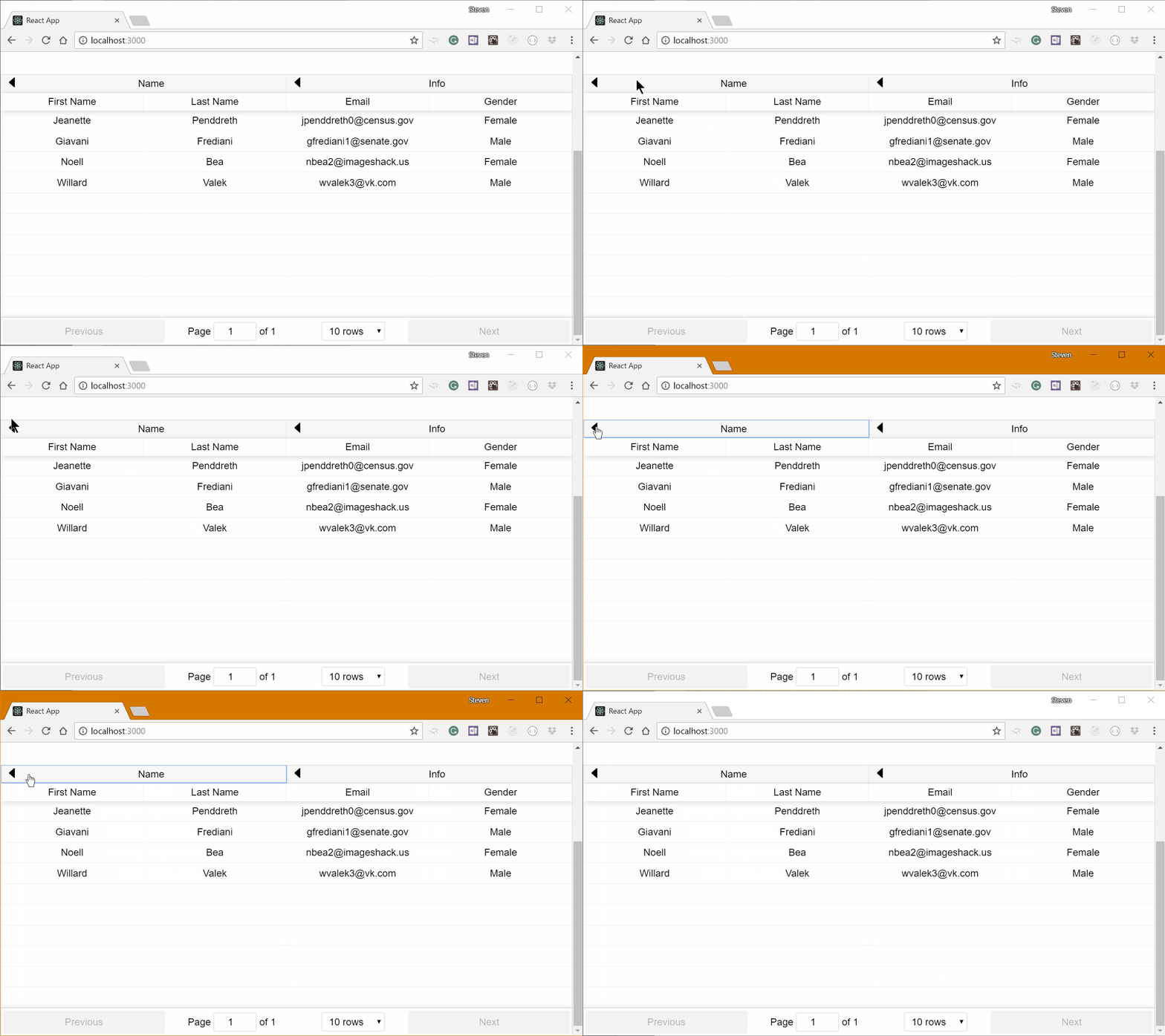
|
||||
|
||||
- With Nornal Columns
|
||||
|
||||
```javascript
|
||||
render() {
|
||||
return <FoldableTable
|
||||
columns={[{
|
||||
Header: "First Name",
|
||||
accessor: "first_name"
|
||||
},
|
||||
{
|
||||
Header: "Last Name",
|
||||
accessor: "last_name",
|
||||
foldable: true,
|
||||
},
|
||||
{
|
||||
Header: "Email",
|
||||
accessor: "email",
|
||||
foldable: true,
|
||||
},
|
||||
{
|
||||
Header: "Gender",
|
||||
accessor: "gender",
|
||||
foldable: true,
|
||||
}]}></FoldableTable>
|
||||
}
|
||||
```
|
||||
|
||||
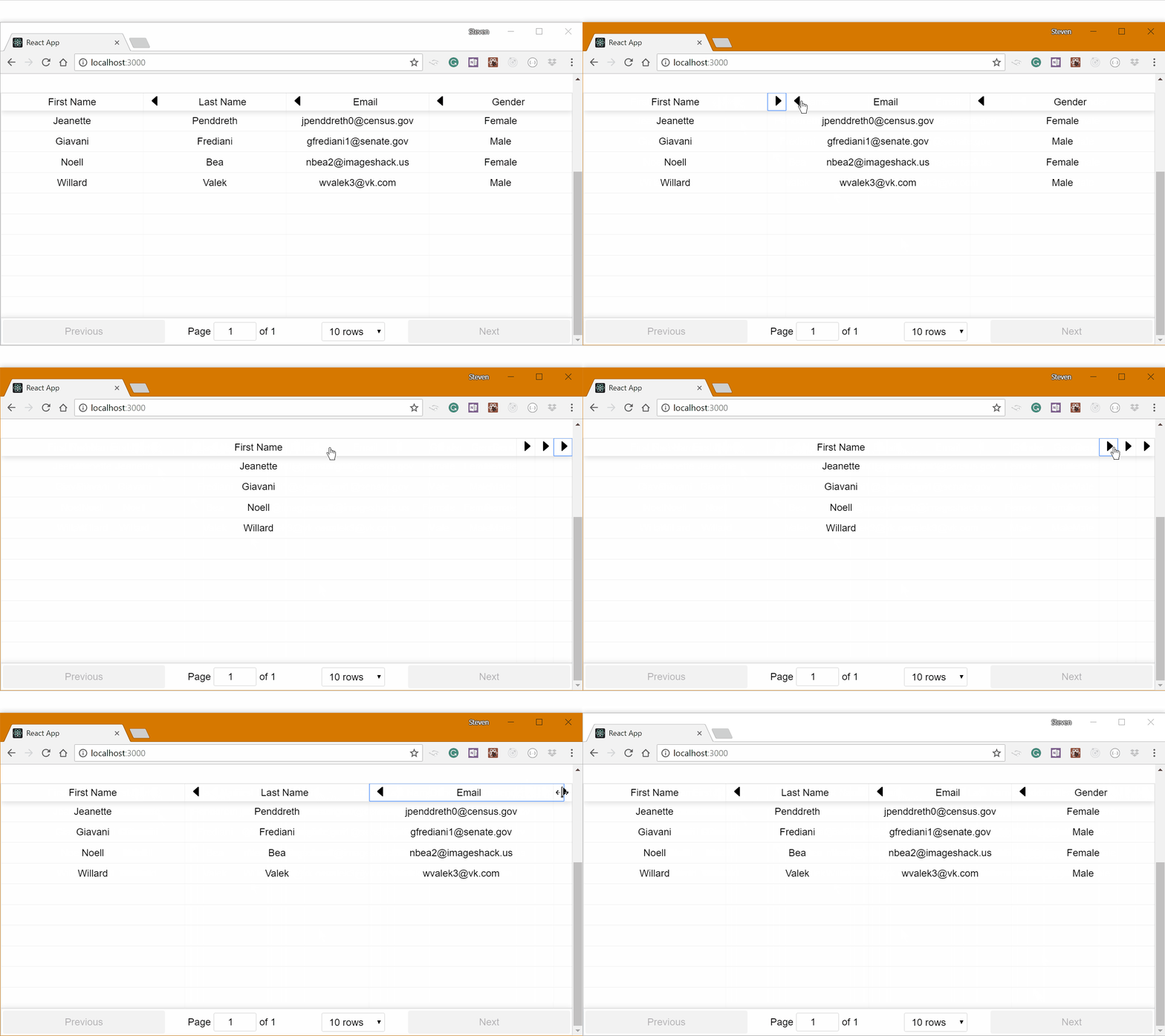
|
||||
|
||||
- The `FoldableTable` also fully compatible with existing HOCs, below is with selectTableHOC.
|
||||
|
||||
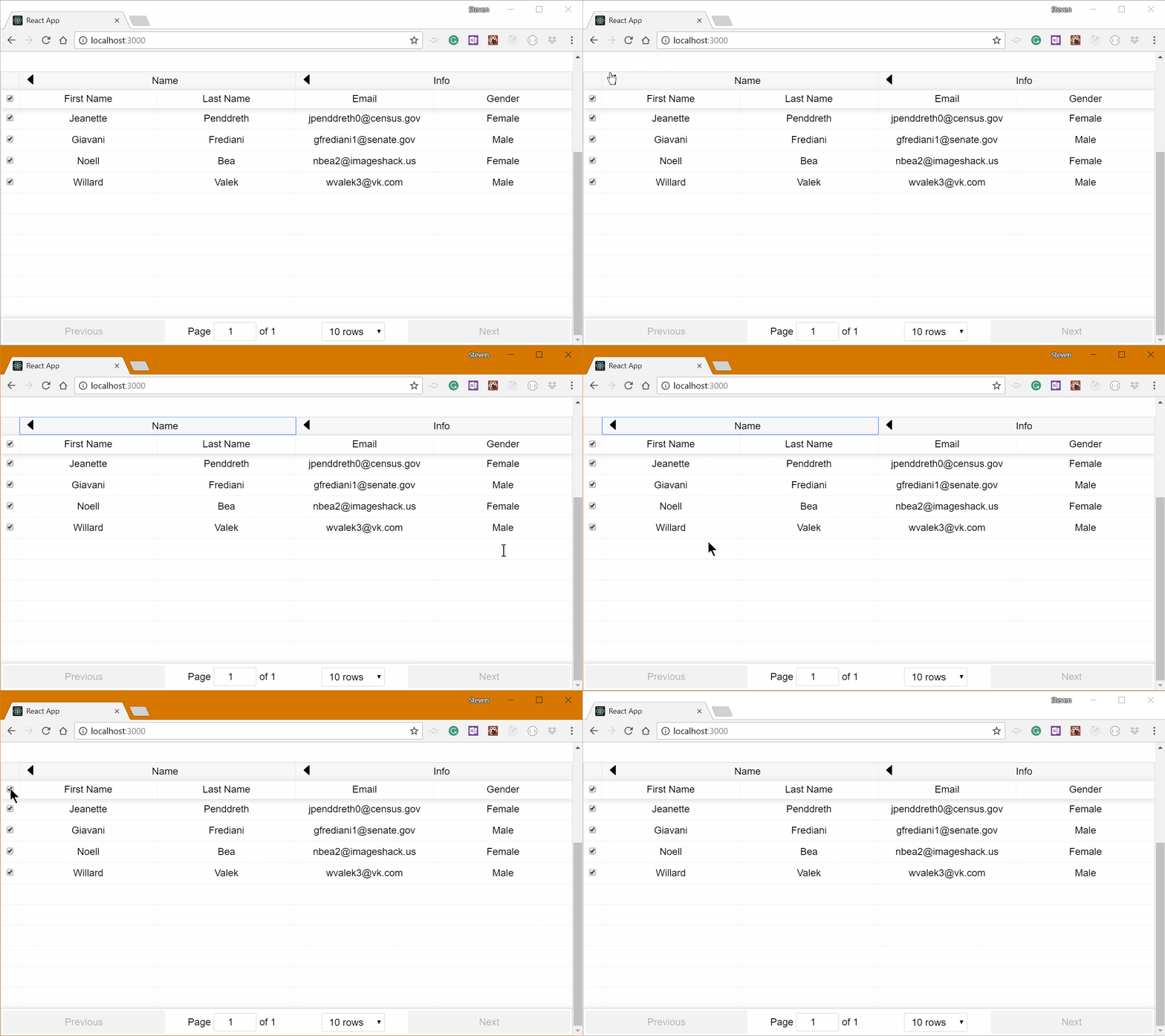
|
||||
|
||||
#### State management
|
||||
|
||||
If you would like to manage the state of FoldableTable, then add the following codes.
|
||||
|
||||
```javascript
|
||||
render() {
|
||||
return <FoldableTable
|
||||
onFoldChange={newFolded => this.setState(p => { return { folded: newFolded } })}
|
||||
folded={this.state.folded}
|
||||
/>
|
||||
}
|
||||
```
|
||||
|
||||
#### Custom Components
|
||||
|
||||
- FoldIconComponent: to render the Icon of buttons.
|
||||
- FoldButtonComponent: to render the folding buttons for each Column.
|
||||
With default rendering as below.
|
||||
|
||||
```javascript
|
||||
const defaultFoldIconComponent = ({ collapsed }) => {
|
||||
//Render your Icon here
|
||||
};
|
||||
|
||||
const defaultFoldButtonComponent = ({ header, collapsed, icon, onClick }) => {
|
||||
//Render your button here.
|
||||
};
|
||||
```
|
||||
|
||||
### AdvancedExpandTable
|
||||
|
||||
HOC which allows any Cell in the row to toggle the row's
|
||||
SubComponent (expand/collapse). Also allows the SubComponent to toggle itself. Technically supports toggling any row's SubComponent.
|
||||
|
||||
These are the expand functions available to any SubComponent or Column Cell:
|
||||
|
||||
```
|
||||
toggleRowSubComponent
|
||||
showRowSubComponent
|
||||
hideRowSubComponent
|
||||
```
|
||||
|
||||
They are available through the `props.columnProps.rest` object.
|
||||
|
||||
On any change to the props, the table will reset the expanded state.
|
||||
|
||||
Accepts a onExpandedChange callback to be called whenever the table expanded state changes
|
||||
|
||||
Note: only supports 1 level of nesting.
|
||||
|
||||
Example usage in a Column Cell Renderer:
|
||||
|
||||
```javascript
|
||||
Cell: props => {
|
||||
const {
|
||||
value
|
||||
columnProps: { rest: { showRowSubComponent } },
|
||||
nestingPath
|
||||
} = props;
|
||||
return (
|
||||
<div>
|
||||
<button
|
||||
onClick={e => showRowSubComponent(nestingPath, e)}
|
||||
>
|
||||
{value}
|
||||
</button>
|
||||
</div>
|
||||
);
|
||||
}
|
||||
```
|
||||
|
||||
Example usage in the ReactTable SubComponent (toggle itself):
|
||||
|
||||
```javascript
|
||||
const AdvancedExpandReactTable = advancedExpandTableHOC(ReactTable);
|
||||
|
||||
<AdvancedExpandReactTable>
|
||||
...
|
||||
SubComponent={({ row, nestingPath, toggleRowSubComponent }) => {
|
||||
return (
|
||||
<div>
|
||||
<button
|
||||
onClick={e => toggleRowSubComponent({ nestingPath }, e)}
|
||||
>
|
||||
{row.value}
|
||||
</button>
|
||||
</div>
|
||||
);
|
||||
}}
|
||||
/>
|
||||
```
|
||||
|
||||
Each Column Renderer (E.g. Cell ) gets the expand functions in its props and each SubComponent gets the expand functions in its props
|
||||
|
||||
Expand functions takes the `nestingPath` or `rowInfo` given to each
|
||||
Column Renderer and SubComponent already by ReactTable.
|
||||
|
||||
## HOC Guide for ReactTable
|
||||
|
||||
There are a few rules required when writing a HOC for ReactTable (other than meeting the normal lint standards - which are
|
||||
still being developed).
|
||||
|
||||
Firstly, there are issues with `ref` when you write a HOC. Consider a deeply nested component wrapped in multiple HOCs...
|
||||
|
||||
A HOC in the middle of the chain requires access to the instance of the component it thinks it is wrapping but there is at
|
||||
least one other wrapper in the way. The challenge is: How do I get to the actual wrapped component?
|
||||
|
||||
Each HOC is required to be a React Class so that a `ref` can be obtained against each component:
|
||||
|
||||
```Javascript
|
||||
<Component ... ref={r => this.wrappedInstance = r} />
|
||||
```
|
||||
|
||||
_NOTE:_ "Component" can also be the `<ReactTable />` instance.
|
||||
|
||||
Then the following method needs
|
||||
to be placed on the class so that it exposes the correct instance of ReactTable:
|
||||
|
||||
```Javascript
|
||||
getWrappedInstance() {
|
||||
if (!this.wrappedInstance) console.warn('<component name here> - No wrapped instance')
|
||||
if (this.wrappedInstance.getWrappedInstance) return this.wrappedInstance.getWrappedInstance()
|
||||
else return this.wrappedInstance
|
||||
}
|
||||
```
|
||||
|
||||
Essentially this will walk down the chain (if there are chained HOCs) and stop when it gets to the end and return the wrapped instance.
|
||||
|
||||
Finally, sometimes the chains need to be in a specific order to function correctly. It is not clear if this is just an architectural
|
||||
issue or if it would be better solved using a library like `recompose`. Anyone who is able to contribute a reliable solution to this
|
||||
is welcome to submit a PR.
|
||||
|
||||
## Contributing
|
||||
|
||||
To suggest a feature, create an issue if it does not already exist.
|
||||
|
||||
Generated
+179
-110
@@ -1,6 +1,6 @@
|
||||
{
|
||||
"name": "react-table",
|
||||
"version": "6.10.3",
|
||||
"version": "6.8.7",
|
||||
"lockfileVersion": 1,
|
||||
"requires": true,
|
||||
"dependencies": {
|
||||
@@ -377,6 +377,12 @@
|
||||
"integrity": "sha1-iYUI2iIm84DfkEcoRWhJwVAaSw0=",
|
||||
"dev": true
|
||||
},
|
||||
"asap": {
|
||||
"version": "2.0.6",
|
||||
"resolved": "https://registry.npmjs.org/asap/-/asap-2.0.6.tgz",
|
||||
"integrity": "sha1-5QNHYR1+aQlDIIu9r+vLwvuGbUY=",
|
||||
"dev": true
|
||||
},
|
||||
"asn1": {
|
||||
"version": "0.2.3",
|
||||
"resolved": "https://registry.npmjs.org/asn1/-/asn1-0.2.3.tgz",
|
||||
@@ -2072,6 +2078,15 @@
|
||||
"integrity": "sha512-PAHp6TxrCy7MGMFidro8uikr+zlJJKJ/Q6mm2ExZ7HwkyR9lSVFfE3kt36qcwa24BQL7y0G9axycGjK1A/0uNQ==",
|
||||
"dev": true
|
||||
},
|
||||
"encoding": {
|
||||
"version": "0.1.12",
|
||||
"resolved": "https://registry.npmjs.org/encoding/-/encoding-0.1.12.tgz",
|
||||
"integrity": "sha1-U4tm8+5izRq1HsMjgp0flIDHS+s=",
|
||||
"dev": true,
|
||||
"requires": {
|
||||
"iconv-lite": "~0.4.13"
|
||||
}
|
||||
},
|
||||
"error-ex": {
|
||||
"version": "1.3.1",
|
||||
"resolved": "https://registry.npmjs.org/error-ex/-/error-ex-1.3.1.tgz",
|
||||
@@ -3022,6 +3037,29 @@
|
||||
"integrity": "sha1-PYpcZog6FqMMqGQ+hR8Zuqd5eRc=",
|
||||
"dev": true
|
||||
},
|
||||
"fbjs": {
|
||||
"version": "0.8.16",
|
||||
"resolved": "https://registry.npmjs.org/fbjs/-/fbjs-0.8.16.tgz",
|
||||
"integrity": "sha1-XmdDL1UNxBtXK/VYR7ispk5TN9s=",
|
||||
"dev": true,
|
||||
"requires": {
|
||||
"core-js": "^1.0.0",
|
||||
"isomorphic-fetch": "^2.1.1",
|
||||
"loose-envify": "^1.0.0",
|
||||
"object-assign": "^4.1.0",
|
||||
"promise": "^7.1.1",
|
||||
"setimmediate": "^1.0.5",
|
||||
"ua-parser-js": "^0.7.9"
|
||||
},
|
||||
"dependencies": {
|
||||
"core-js": {
|
||||
"version": "1.2.7",
|
||||
"resolved": "https://registry.npmjs.org/core-js/-/core-js-1.2.7.tgz",
|
||||
"integrity": "sha1-ZSKUwUZR2yj6k70tX/KYOk8IxjY=",
|
||||
"dev": true
|
||||
}
|
||||
}
|
||||
},
|
||||
"figures": {
|
||||
"version": "2.0.0",
|
||||
"resolved": "https://registry.npmjs.org/figures/-/figures-2.0.0.tgz",
|
||||
@@ -3196,8 +3234,7 @@
|
||||
"ansi-regex": {
|
||||
"version": "2.1.1",
|
||||
"bundled": true,
|
||||
"dev": true,
|
||||
"optional": true
|
||||
"dev": true
|
||||
},
|
||||
"aproba": {
|
||||
"version": "1.2.0",
|
||||
@@ -3211,8 +3248,8 @@
|
||||
"dev": true,
|
||||
"optional": true,
|
||||
"requires": {
|
||||
"delegates": "^1.0.0",
|
||||
"readable-stream": "^2.0.6"
|
||||
"delegates": "1.0.0",
|
||||
"readable-stream": "2.3.6"
|
||||
}
|
||||
},
|
||||
"balanced-match": {
|
||||
@@ -3227,7 +3264,7 @@
|
||||
"dev": true,
|
||||
"optional": true,
|
||||
"requires": {
|
||||
"balanced-match": "^1.0.0",
|
||||
"balanced-match": "1.0.0",
|
||||
"concat-map": "0.0.1"
|
||||
}
|
||||
},
|
||||
@@ -3294,7 +3331,7 @@
|
||||
"dev": true,
|
||||
"optional": true,
|
||||
"requires": {
|
||||
"minipass": "^2.2.1"
|
||||
"minipass": "2.2.4"
|
||||
}
|
||||
},
|
||||
"fs.realpath": {
|
||||
@@ -3309,14 +3346,14 @@
|
||||
"dev": true,
|
||||
"optional": true,
|
||||
"requires": {
|
||||
"aproba": "^1.0.3",
|
||||
"console-control-strings": "^1.0.0",
|
||||
"has-unicode": "^2.0.0",
|
||||
"object-assign": "^4.1.0",
|
||||
"signal-exit": "^3.0.0",
|
||||
"string-width": "^1.0.1",
|
||||
"strip-ansi": "^3.0.1",
|
||||
"wide-align": "^1.1.0"
|
||||
"aproba": "1.2.0",
|
||||
"console-control-strings": "1.1.0",
|
||||
"has-unicode": "2.0.1",
|
||||
"object-assign": "4.1.1",
|
||||
"signal-exit": "3.0.2",
|
||||
"string-width": "1.0.2",
|
||||
"strip-ansi": "3.0.1",
|
||||
"wide-align": "1.1.2"
|
||||
}
|
||||
},
|
||||
"glob": {
|
||||
@@ -3325,12 +3362,12 @@
|
||||
"dev": true,
|
||||
"optional": true,
|
||||
"requires": {
|
||||
"fs.realpath": "^1.0.0",
|
||||
"inflight": "^1.0.4",
|
||||
"inherits": "2",
|
||||
"minimatch": "^3.0.4",
|
||||
"once": "^1.3.0",
|
||||
"path-is-absolute": "^1.0.0"
|
||||
"fs.realpath": "1.0.0",
|
||||
"inflight": "1.0.6",
|
||||
"inherits": "2.0.3",
|
||||
"minimatch": "3.0.4",
|
||||
"once": "1.4.0",
|
||||
"path-is-absolute": "1.0.1"
|
||||
}
|
||||
},
|
||||
"has-unicode": {
|
||||
@@ -3345,7 +3382,7 @@
|
||||
"dev": true,
|
||||
"optional": true,
|
||||
"requires": {
|
||||
"safer-buffer": "^2.1.0"
|
||||
"safer-buffer": "2.1.2"
|
||||
}
|
||||
},
|
||||
"ignore-walk": {
|
||||
@@ -3354,7 +3391,7 @@
|
||||
"dev": true,
|
||||
"optional": true,
|
||||
"requires": {
|
||||
"minimatch": "^3.0.4"
|
||||
"minimatch": "3.0.4"
|
||||
}
|
||||
},
|
||||
"inflight": {
|
||||
@@ -3363,8 +3400,8 @@
|
||||
"dev": true,
|
||||
"optional": true,
|
||||
"requires": {
|
||||
"once": "^1.3.0",
|
||||
"wrappy": "1"
|
||||
"once": "1.4.0",
|
||||
"wrappy": "1.0.2"
|
||||
}
|
||||
},
|
||||
"inherits": {
|
||||
@@ -3385,7 +3422,7 @@
|
||||
"dev": true,
|
||||
"optional": true,
|
||||
"requires": {
|
||||
"number-is-nan": "^1.0.0"
|
||||
"number-is-nan": "1.0.1"
|
||||
}
|
||||
},
|
||||
"isarray": {
|
||||
@@ -3400,7 +3437,7 @@
|
||||
"dev": true,
|
||||
"optional": true,
|
||||
"requires": {
|
||||
"brace-expansion": "^1.1.7"
|
||||
"brace-expansion": "1.1.11"
|
||||
}
|
||||
},
|
||||
"minimist": {
|
||||
@@ -3415,8 +3452,8 @@
|
||||
"dev": true,
|
||||
"optional": true,
|
||||
"requires": {
|
||||
"safe-buffer": "^5.1.1",
|
||||
"yallist": "^3.0.0"
|
||||
"safe-buffer": "5.1.1",
|
||||
"yallist": "3.0.2"
|
||||
}
|
||||
},
|
||||
"minizlib": {
|
||||
@@ -3425,7 +3462,7 @@
|
||||
"dev": true,
|
||||
"optional": true,
|
||||
"requires": {
|
||||
"minipass": "^2.2.1"
|
||||
"minipass": "2.2.4"
|
||||
}
|
||||
},
|
||||
"mkdirp": {
|
||||
@@ -3449,9 +3486,9 @@
|
||||
"dev": true,
|
||||
"optional": true,
|
||||
"requires": {
|
||||
"debug": "^2.1.2",
|
||||
"iconv-lite": "^0.4.4",
|
||||
"sax": "^1.2.4"
|
||||
"debug": "2.6.9",
|
||||
"iconv-lite": "0.4.21",
|
||||
"sax": "1.2.4"
|
||||
}
|
||||
},
|
||||
"node-pre-gyp": {
|
||||
@@ -3460,16 +3497,16 @@
|
||||
"dev": true,
|
||||
"optional": true,
|
||||
"requires": {
|
||||
"detect-libc": "^1.0.2",
|
||||
"mkdirp": "^0.5.1",
|
||||
"needle": "^2.2.0",
|
||||
"nopt": "^4.0.1",
|
||||
"npm-packlist": "^1.1.6",
|
||||
"npmlog": "^4.0.2",
|
||||
"rc": "^1.1.7",
|
||||
"rimraf": "^2.6.1",
|
||||
"semver": "^5.3.0",
|
||||
"tar": "^4"
|
||||
"detect-libc": "1.0.3",
|
||||
"mkdirp": "0.5.1",
|
||||
"needle": "2.2.0",
|
||||
"nopt": "4.0.1",
|
||||
"npm-packlist": "1.1.10",
|
||||
"npmlog": "4.1.2",
|
||||
"rc": "1.2.6",
|
||||
"rimraf": "2.6.2",
|
||||
"semver": "5.5.0",
|
||||
"tar": "4.4.1"
|
||||
}
|
||||
},
|
||||
"nopt": {
|
||||
@@ -3478,8 +3515,8 @@
|
||||
"dev": true,
|
||||
"optional": true,
|
||||
"requires": {
|
||||
"abbrev": "1",
|
||||
"osenv": "^0.1.4"
|
||||
"abbrev": "1.1.1",
|
||||
"osenv": "0.1.5"
|
||||
}
|
||||
},
|
||||
"npm-bundled": {
|
||||
@@ -3494,8 +3531,8 @@
|
||||
"dev": true,
|
||||
"optional": true,
|
||||
"requires": {
|
||||
"ignore-walk": "^3.0.1",
|
||||
"npm-bundled": "^1.0.1"
|
||||
"ignore-walk": "3.0.1",
|
||||
"npm-bundled": "1.0.3"
|
||||
}
|
||||
},
|
||||
"npmlog": {
|
||||
@@ -3504,10 +3541,10 @@
|
||||
"dev": true,
|
||||
"optional": true,
|
||||
"requires": {
|
||||
"are-we-there-yet": "~1.1.2",
|
||||
"console-control-strings": "~1.1.0",
|
||||
"gauge": "~2.7.3",
|
||||
"set-blocking": "~2.0.0"
|
||||
"are-we-there-yet": "1.1.4",
|
||||
"console-control-strings": "1.1.0",
|
||||
"gauge": "2.7.4",
|
||||
"set-blocking": "2.0.0"
|
||||
}
|
||||
},
|
||||
"number-is-nan": {
|
||||
@@ -3528,7 +3565,7 @@
|
||||
"dev": true,
|
||||
"optional": true,
|
||||
"requires": {
|
||||
"wrappy": "1"
|
||||
"wrappy": "1.0.2"
|
||||
}
|
||||
},
|
||||
"os-homedir": {
|
||||
@@ -3549,8 +3586,8 @@
|
||||
"dev": true,
|
||||
"optional": true,
|
||||
"requires": {
|
||||
"os-homedir": "^1.0.0",
|
||||
"os-tmpdir": "^1.0.0"
|
||||
"os-homedir": "1.0.2",
|
||||
"os-tmpdir": "1.0.2"
|
||||
}
|
||||
},
|
||||
"path-is-absolute": {
|
||||
@@ -3571,10 +3608,10 @@
|
||||
"dev": true,
|
||||
"optional": true,
|
||||
"requires": {
|
||||
"deep-extend": "~0.4.0",
|
||||
"ini": "~1.3.0",
|
||||
"minimist": "^1.2.0",
|
||||
"strip-json-comments": "~2.0.1"
|
||||
"deep-extend": "0.4.2",
|
||||
"ini": "1.3.5",
|
||||
"minimist": "1.2.0",
|
||||
"strip-json-comments": "2.0.1"
|
||||
},
|
||||
"dependencies": {
|
||||
"minimist": {
|
||||
@@ -3591,13 +3628,13 @@
|
||||
"dev": true,
|
||||
"optional": true,
|
||||
"requires": {
|
||||
"core-util-is": "~1.0.0",
|
||||
"inherits": "~2.0.3",
|
||||
"isarray": "~1.0.0",
|
||||
"process-nextick-args": "~2.0.0",
|
||||
"safe-buffer": "~5.1.1",
|
||||
"string_decoder": "~1.1.1",
|
||||
"util-deprecate": "~1.0.1"
|
||||
"core-util-is": "1.0.2",
|
||||
"inherits": "2.0.3",
|
||||
"isarray": "1.0.0",
|
||||
"process-nextick-args": "2.0.0",
|
||||
"safe-buffer": "5.1.1",
|
||||
"string_decoder": "1.1.1",
|
||||
"util-deprecate": "1.0.2"
|
||||
}
|
||||
},
|
||||
"rimraf": {
|
||||
@@ -3606,14 +3643,13 @@
|
||||
"dev": true,
|
||||
"optional": true,
|
||||
"requires": {
|
||||
"glob": "^7.0.5"
|
||||
"glob": "7.1.2"
|
||||
}
|
||||
},
|
||||
"safe-buffer": {
|
||||
"version": "5.1.1",
|
||||
"bundled": true,
|
||||
"dev": true,
|
||||
"optional": true
|
||||
"dev": true
|
||||
},
|
||||
"safer-buffer": {
|
||||
"version": "2.1.2",
|
||||
@@ -3651,9 +3687,9 @@
|
||||
"dev": true,
|
||||
"optional": true,
|
||||
"requires": {
|
||||
"code-point-at": "^1.0.0",
|
||||
"is-fullwidth-code-point": "^1.0.0",
|
||||
"strip-ansi": "^3.0.0"
|
||||
"code-point-at": "1.1.0",
|
||||
"is-fullwidth-code-point": "1.0.0",
|
||||
"strip-ansi": "3.0.1"
|
||||
}
|
||||
},
|
||||
"string_decoder": {
|
||||
@@ -3662,16 +3698,15 @@
|
||||
"dev": true,
|
||||
"optional": true,
|
||||
"requires": {
|
||||
"safe-buffer": "~5.1.0"
|
||||
"safe-buffer": "5.1.1"
|
||||
}
|
||||
},
|
||||
"strip-ansi": {
|
||||
"version": "3.0.1",
|
||||
"bundled": true,
|
||||
"dev": true,
|
||||
"optional": true,
|
||||
"requires": {
|
||||
"ansi-regex": "^2.0.0"
|
||||
"ansi-regex": "2.1.1"
|
||||
}
|
||||
},
|
||||
"strip-json-comments": {
|
||||
@@ -3686,13 +3721,13 @@
|
||||
"dev": true,
|
||||
"optional": true,
|
||||
"requires": {
|
||||
"chownr": "^1.0.1",
|
||||
"fs-minipass": "^1.2.5",
|
||||
"minipass": "^2.2.4",
|
||||
"minizlib": "^1.1.0",
|
||||
"mkdirp": "^0.5.0",
|
||||
"safe-buffer": "^5.1.1",
|
||||
"yallist": "^3.0.2"
|
||||
"chownr": "1.0.1",
|
||||
"fs-minipass": "1.2.5",
|
||||
"minipass": "2.2.4",
|
||||
"minizlib": "1.1.0",
|
||||
"mkdirp": "0.5.1",
|
||||
"safe-buffer": "5.1.1",
|
||||
"yallist": "3.0.2"
|
||||
}
|
||||
},
|
||||
"util-deprecate": {
|
||||
@@ -3707,20 +3742,18 @@
|
||||
"dev": true,
|
||||
"optional": true,
|
||||
"requires": {
|
||||
"string-width": "^1.0.2"
|
||||
"string-width": "1.0.2"
|
||||
}
|
||||
},
|
||||
"wrappy": {
|
||||
"version": "1.0.2",
|
||||
"bundled": true,
|
||||
"dev": true,
|
||||
"optional": true
|
||||
"dev": true
|
||||
},
|
||||
"yallist": {
|
||||
"version": "3.0.2",
|
||||
"bundled": true,
|
||||
"dev": true,
|
||||
"optional": true
|
||||
"dev": true
|
||||
}
|
||||
}
|
||||
},
|
||||
@@ -4417,6 +4450,12 @@
|
||||
"integrity": "sha512-qgDYXFSR5WvEfuS5dMj6oTMEbrrSaM0CrFk2Yiq/gXnBvD9pMa2jGXxyhGLfvhZpuMZe18CJpFxAt3CRs42NMg==",
|
||||
"dev": true
|
||||
},
|
||||
"is-stream": {
|
||||
"version": "1.1.0",
|
||||
"resolved": "https://registry.npmjs.org/is-stream/-/is-stream-1.1.0.tgz",
|
||||
"integrity": "sha1-EtSj3U5o4Lec6428hBc66A2RykQ=",
|
||||
"dev": true
|
||||
},
|
||||
"is-symbol": {
|
||||
"version": "1.0.1",
|
||||
"resolved": "https://registry.npmjs.org/is-symbol/-/is-symbol-1.0.1.tgz",
|
||||
@@ -4462,6 +4501,16 @@
|
||||
"isarray": "1.0.0"
|
||||
}
|
||||
},
|
||||
"isomorphic-fetch": {
|
||||
"version": "2.2.1",
|
||||
"resolved": "https://registry.npmjs.org/isomorphic-fetch/-/isomorphic-fetch-2.2.1.tgz",
|
||||
"integrity": "sha1-YRrhrPFPXoH3KVB0coGf6XM1WKk=",
|
||||
"dev": true,
|
||||
"requires": {
|
||||
"node-fetch": "^1.0.1",
|
||||
"whatwg-fetch": ">=0.10.0"
|
||||
}
|
||||
},
|
||||
"isstream": {
|
||||
"version": "0.1.2",
|
||||
"resolved": "https://registry.npmjs.org/isstream/-/isstream-0.1.2.tgz",
|
||||
@@ -4962,6 +5011,16 @@
|
||||
"integrity": "sha512-2NpiFHqC87y/zFke0fC0spBXL3bBsoh/p5H1EFhshxjCR5+0g2d6BiXbUFz9v1sAcxsk2htp2eQnNIci2dIYcA==",
|
||||
"dev": true
|
||||
},
|
||||
"node-fetch": {
|
||||
"version": "1.7.3",
|
||||
"resolved": "https://registry.npmjs.org/node-fetch/-/node-fetch-1.7.3.tgz",
|
||||
"integrity": "sha512-NhZ4CsKx7cYm2vSrBAr2PvFOe6sWDf0UYLRqA6svUYg7+/TSfVAu49jYC4BvQ4Sms9SZgdqGBgroqfDhJdTyKQ==",
|
||||
"dev": true,
|
||||
"requires": {
|
||||
"encoding": "^0.1.11",
|
||||
"is-stream": "^1.0.1"
|
||||
}
|
||||
},
|
||||
"normalize-package-data": {
|
||||
"version": "2.4.0",
|
||||
"resolved": "https://registry.npmjs.org/normalize-package-data/-/normalize-package-data-2.4.0.tgz",
|
||||
@@ -5626,26 +5685,24 @@
|
||||
"integrity": "sha1-ihvjZr+Pwj2yvSPxDG/pILQ4nR8=",
|
||||
"dev": true
|
||||
},
|
||||
"prop-types": {
|
||||
"version": "15.7.2",
|
||||
"resolved": "https://registry.npmjs.org/prop-types/-/prop-types-15.7.2.tgz",
|
||||
"integrity": "sha512-8QQikdH7//R2vurIJSutZ1smHYTcLpRWEOlHnzcWHmBYrOGUysKwSsrC89BCiFj3CbrfJ/nXFdJepOVrY1GCHQ==",
|
||||
"promise": {
|
||||
"version": "7.3.1",
|
||||
"resolved": "https://registry.npmjs.org/promise/-/promise-7.3.1.tgz",
|
||||
"integrity": "sha512-nolQXZ/4L+bP/UGlkfaIujX9BKxGwmQ9OT4mOt5yvy8iK1h3wqTEJCijzGANTCCl9nWjY41juyAn2K3Q1hLLTg==",
|
||||
"dev": true,
|
||||
"requires": {
|
||||
"loose-envify": "^1.4.0",
|
||||
"object-assign": "^4.1.1",
|
||||
"react-is": "^16.8.1"
|
||||
},
|
||||
"dependencies": {
|
||||
"loose-envify": {
|
||||
"version": "1.4.0",
|
||||
"resolved": "https://registry.npmjs.org/loose-envify/-/loose-envify-1.4.0.tgz",
|
||||
"integrity": "sha512-lyuxPGr/Wfhrlem2CL/UcnUc1zcqKAImBDzukY7Y5F/yQiNdko6+fRLevlw1HgMySw7f611UIY408EtxRSoK3Q==",
|
||||
"dev": true,
|
||||
"requires": {
|
||||
"js-tokens": "^3.0.0 || ^4.0.0"
|
||||
}
|
||||
}
|
||||
"asap": "~2.0.3"
|
||||
}
|
||||
},
|
||||
"prop-types": {
|
||||
"version": "15.6.1",
|
||||
"resolved": "https://registry.npmjs.org/prop-types/-/prop-types-15.6.1.tgz",
|
||||
"integrity": "sha512-4ec7bY1Y66LymSUOH/zARVYObB23AT2h8cf6e/O6ZALB/N0sqZFEx7rq6EYPX2MkOdKORuooI/H5k9TlR4q7kQ==",
|
||||
"dev": true,
|
||||
"requires": {
|
||||
"fbjs": "^0.8.16",
|
||||
"loose-envify": "^1.3.1",
|
||||
"object-assign": "^4.1.1"
|
||||
}
|
||||
},
|
||||
"ps-tree": {
|
||||
@@ -5782,12 +5839,6 @@
|
||||
}
|
||||
}
|
||||
},
|
||||
"react-is": {
|
||||
"version": "16.9.0",
|
||||
"resolved": "https://registry.npmjs.org/react-is/-/react-is-16.9.0.tgz",
|
||||
"integrity": "sha512-tJBzzzIgnnRfEm046qRcURvwQnZVXmuCbscxUO5RWrGTXpon2d4c8mI0D8WE6ydVIm29JiLB6+RslkIvym9Rjw==",
|
||||
"dev": true
|
||||
},
|
||||
"react-json-tree": {
|
||||
"version": "0.10.9",
|
||||
"resolved": "https://registry.npmjs.org/react-json-tree/-/react-json-tree-0.10.9.tgz",
|
||||
@@ -6920,6 +6971,12 @@
|
||||
}
|
||||
}
|
||||
},
|
||||
"setimmediate": {
|
||||
"version": "1.0.5",
|
||||
"resolved": "https://registry.npmjs.org/setimmediate/-/setimmediate-1.0.5.tgz",
|
||||
"integrity": "sha1-KQy7Iy4waULX1+qbg3Mqt4VvgoU=",
|
||||
"dev": true
|
||||
},
|
||||
"shebang-command": {
|
||||
"version": "1.2.0",
|
||||
"resolved": "https://registry.npmjs.org/shebang-command/-/shebang-command-1.2.0.tgz",
|
||||
@@ -7933,6 +7990,12 @@
|
||||
"integrity": "sha1-hnrHTjhkGHsdPUfZlqeOxciDB3c=",
|
||||
"dev": true
|
||||
},
|
||||
"ua-parser-js": {
|
||||
"version": "0.7.18",
|
||||
"resolved": "https://registry.npmjs.org/ua-parser-js/-/ua-parser-js-0.7.18.tgz",
|
||||
"integrity": "sha512-LtzwHlVHwFGTptfNSgezHp7WUlwiqb0gA9AALRbKaERfxwJoiX0A73QbTToxteIAuIaFshhgIZfqK8s7clqgnA==",
|
||||
"dev": true
|
||||
},
|
||||
"uglify-es": {
|
||||
"version": "3.3.9",
|
||||
"resolved": "https://registry.npmjs.org/uglify-es/-/uglify-es-3.3.9.tgz",
|
||||
@@ -8121,6 +8184,12 @@
|
||||
"integrity": "sha512-DRibZL6DsNhIgYQ+wNdWDL2SL3bKPlVrRiBqV5yuMm++op8W4kGFtaQfCs4KEJn0wBZcHVHJ3eoywX8983k1ow==",
|
||||
"dev": true
|
||||
},
|
||||
"whatwg-fetch": {
|
||||
"version": "2.0.4",
|
||||
"resolved": "https://registry.npmjs.org/whatwg-fetch/-/whatwg-fetch-2.0.4.tgz",
|
||||
"integrity": "sha512-dcQ1GWpOD/eEQ97k66aiEVpNnapVj90/+R+SXTPYGHpYBBypfKJEQjLrvMZ7YXbKm21gXd4NcuxUTjiv1YtLng==",
|
||||
"dev": true
|
||||
},
|
||||
"which": {
|
||||
"version": "1.3.0",
|
||||
"resolved": "https://registry.npmjs.org/which/-/which-1.3.0.tgz",
|
||||
|
||||
+4
-4
@@ -1,6 +1,6 @@
|
||||
{
|
||||
"name": "react-table",
|
||||
"version": "6.11.2",
|
||||
"version": "6.9.0",
|
||||
"description": "A fast, lightweight, opinionated table and datagrid built on React",
|
||||
"license": "MIT",
|
||||
"homepage": "https://github.com/react-tools/react-table#readme",
|
||||
@@ -47,8 +47,8 @@
|
||||
},
|
||||
"peerDependencies": {
|
||||
"prop-types": "^15.5.0",
|
||||
"react": "^16.x.x",
|
||||
"react-dom": "^16.x.x"
|
||||
"react": "^15.x.x || ^16.x.x",
|
||||
"react-dom": "^15.x.x || ^16.x.x"
|
||||
},
|
||||
"devDependencies": {
|
||||
"autoprefixer": "^6.7.0",
|
||||
@@ -70,7 +70,7 @@
|
||||
"npm-run-all": "^4.1.2",
|
||||
"onchange": "^3.0.2",
|
||||
"postcss-cli": "^2.6.0",
|
||||
"prop-types": "^15.7.2",
|
||||
"prop-types": "^15.6.0",
|
||||
"react": "^16.3.2",
|
||||
"react-dom": "^16.3.2",
|
||||
"react-json-tree": "^0.10.9",
|
||||
|
||||
@@ -0,0 +1,316 @@
|
||||
<div style="text-align:center;">
|
||||
<a href="https://github.com/react-tools/react-table" target="\_parent"><img src="https://github.com/react-tools/media/raw/master/logo-react-table.png" alt="React Table Logo" style="width:450px;"/></a>
|
||||
</div>
|
||||
|
||||
# ReactTable - expanding with HOCs
|
||||
|
||||
This documentation is about expanding ReactTable using Higher Order Components/Functions.
|
||||
|
||||
## Covered in this README
|
||||
|
||||
* A Brief explanation of HOCs and why they are a good approach for ReactTable enhancements
|
||||
* Documentation of the currently available HOCs
|
||||
* TreeTable
|
||||
* SelectTable
|
||||
* Documentation of the standard for writing HOCs with ReactTable
|
||||
|
||||
## What are HOCs and why use them with ReactTable
|
||||
|
||||
HOCs (or Higher Order Components/Functions) are either a React Component (or a function that returns a React Component)
|
||||
that are used to enhance the functionality of an existing component. How much you can enhance depends on the props that
|
||||
the component exposes.
|
||||
|
||||
Fortunately, ReactTable exposes a LOT of functionality as props to the component. In some cases there are too many
|
||||
props to keep track of and that is where HOCs come in.
|
||||
|
||||
You can write a HOC that just focusses on the additional functionality you want to enhance and keep those enhancements to
|
||||
reuse over and over again when you need them. You don't have to edit the ReactSource code, just wrap ReactTable in one or
|
||||
more HOCs (more on some issues related to chaining HOCs later) that provide the additional functionality you want to expose.
|
||||
|
||||
The most obvious HOC is one that can add `checkbox` or select functionality. The HOC included provides `select` functionality
|
||||
that allows the developer to specify if they want a `checkbox` or `radio` style of select column. The implementation of the
|
||||
selection is recorded (e.g. in component state, Redux, etc.) and how to manage multiple selections. The HOC really only handles
|
||||
the rendering pieces.
|
||||
|
||||
But there is more documentation on the `select` HOC below.
|
||||
|
||||
## Currently Available HOCs
|
||||
|
||||
Any of the below HOCs can be imported from react-table like so:
|
||||
|
||||
```javascript
|
||||
import ReactTable from "react-table";
|
||||
import treeTableHOC from "react-table/lib/hoc/treeTable";
|
||||
|
||||
const TreeTable = treeTableHOC(ReactTable);
|
||||
```
|
||||
|
||||
Swap `treeTable` and `TreeTable` with any of the other HOC names as necessary.
|
||||
|
||||
### TreeTable
|
||||
|
||||
TreeTable takes over the rendering of the generated pivot rows of ReactTable so that they appear more like an expandable Tree.
|
||||
|
||||
It accomplishes this by rendering a 100% wide div and then only rendering the cell that controls the pivot at that level.
|
||||
|
||||
Using it is as simple as doing the following:
|
||||
|
||||
```javascript
|
||||
const TreeTable = treeTableHOC(ReactTable);
|
||||
```
|
||||
|
||||
After you have done the above, you can then use `TreeTable` just as you would `ReactTable` but it will render pivots using
|
||||
the Tree style described above.
|
||||
|
||||
### SelectTable
|
||||
|
||||
SelectTable is a little trickier. The HOCs attempt to avoid adding additional state and, as there is no internal ID for a row that
|
||||
can be relied on to be static (ReactTable just reuses indexes when rendering) the developer has to maintain the state outside of even
|
||||
the wrapped component. So it is largely based on callbacks.
|
||||
|
||||
You include the HOC in the same manner as you would for the treeTableHOC but then need to provide the following overrides:
|
||||
|
||||
* isSelected - returns `true` if the key passed is selected otherwise it should return `false`
|
||||
* selectAll - a property that indicates if the selectAll is set (`true|false`)
|
||||
* toggleAll - called when the user clicks the `selectAll` checkbox/radio
|
||||
* toggleSelection - called when the use clicks a specific checkbox/radio in a row
|
||||
* selectType - either `checkbox|radio` to indicate what type of selection is required
|
||||
|
||||
**Note:** The select field defaults to the accessor `_id` property in order to render the select field for that particular row. If your objects have different
|
||||
unique ID fields, make sure to tell React Table that by passing it the `keyField` property.
|
||||
|
||||
```javascript
|
||||
<ReactTable keyField='id' />
|
||||
```
|
||||
|
||||
In the case of `radio` there is no `selectAll` displayed but the developer is responsible for only making one selection in
|
||||
the controlling component's state. You could select multiple but it wouldn't make sense and you should use `checkbox` instead.
|
||||
|
||||
You also have to decide what `selectAll` means. Given ReactTable is a paged solution there are other records off-page. When someone
|
||||
selects the `selectAll` checkbox, should it mark every possible record, only what might be visible to due a Filter or only those items
|
||||
on the current page?
|
||||
|
||||
The example opts for the middle approach so it gets a `ref` to the ReactTable instance and pulls the `sortedData` out of the resolved
|
||||
state (then walks through those records and pulls their ID into the `selection` state of the controlling component).
|
||||
|
||||
You can also replace the input component that is used to render the select box and select all box:
|
||||
|
||||
* SelectAllInputComponent - the checkbox in the top left corner
|
||||
* SelectInputComponent - the checkbox used on a row
|
||||
|
||||
### SelectTreeTable
|
||||
|
||||
SelectTreeTable is a combination of TreeTable and SelectTable.
|
||||
|
||||
To function correctly the chain has to be in the correct order as follows (see the comments in the guid on HOCs below).
|
||||
|
||||
```javascript
|
||||
const SelectTreeTable = selectTableHOC(treeTableHOC(ReactTable));
|
||||
```
|
||||
|
||||
In this particular instance it is (probably) because the functions need access to the state on the wrapped component to manage
|
||||
the selected items. Although that is not totally clearly the issue.
|
||||
|
||||
### FoldableTable
|
||||
FoldableTable is a HOC that make the columns are foldable. The reason I developed this HOC because when working on the real project related to the financial which display so many columns for validation and comparison.
|
||||
|
||||
So foldable columns allow users to temporary hidden the unwanted to columns so that they can focus on the data that they want to see.
|
||||
|
||||
#### How it works
|
||||
|
||||
```javascript
|
||||
const FoldableTable = FoldableTableHOC(ReactTable);
|
||||
```
|
||||
|
||||
It will scan all the columns which `foldable` is `true` and apply the foldable column feature. This feature will work for both normal columns and header columns as samples below.
|
||||
|
||||
- With Header Columns
|
||||
```javascript
|
||||
render(){
|
||||
return <FoldableTable
|
||||
columns={[{
|
||||
Header: "Name",
|
||||
foldable: true,
|
||||
columns: [{
|
||||
Header: "First Name",
|
||||
accessor: "first_name"
|
||||
},{
|
||||
Header: "Last Name",
|
||||
accessor: "last_name"
|
||||
}]
|
||||
},{
|
||||
Header: "Info",
|
||||
foldable: true,
|
||||
columns: [{
|
||||
Header: "Email",
|
||||
accessor: "email"
|
||||
},{
|
||||
Header: "Gender",
|
||||
accessor: "gender"
|
||||
}]
|
||||
}]
|
||||
}/>
|
||||
}
|
||||
```
|
||||
|
||||

|
||||
|
||||
- With Nornal Columns
|
||||
```javascript
|
||||
render() {
|
||||
return <FoldableTable
|
||||
columns={[{
|
||||
Header: "First Name",
|
||||
accessor: "first_name"
|
||||
},
|
||||
{
|
||||
Header: "Last Name",
|
||||
accessor: "last_name",
|
||||
foldable: true,
|
||||
},
|
||||
{
|
||||
Header: "Email",
|
||||
accessor: "email",
|
||||
foldable: true,
|
||||
},
|
||||
{
|
||||
Header: "Gender",
|
||||
accessor: "gender",
|
||||
foldable: true,
|
||||
}]}></FoldableTable>
|
||||
}
|
||||
```
|
||||
|
||||

|
||||
|
||||
- The `FoldableTable` also fully compatible with existing HOCs, below is with selectTableHOC.
|
||||
|
||||

|
||||
|
||||
#### State management
|
||||
If you would like to manage the state of FoldableTable, then add the following codes.
|
||||
```javascript
|
||||
render() {
|
||||
return <FoldableTable
|
||||
onFoldChange={newFolded => this.setState(p => { return { folded: newFolded } })}
|
||||
folded={this.state.folded}
|
||||
/>
|
||||
}
|
||||
```
|
||||
#### Custom Components
|
||||
- FoldIconComponent: to render the Icon of buttons.
|
||||
- FoldButtonComponent: to render the folding buttons for each Column.
|
||||
With default rendering as below.
|
||||
|
||||
```javascript
|
||||
const defaultFoldIconComponent = ({ collapsed }) => {
|
||||
//Render your Icon here
|
||||
}
|
||||
|
||||
const defaultFoldButtonComponent = ({ header, collapsed, icon, onClick }) => {
|
||||
//Render your button here.
|
||||
}
|
||||
```
|
||||
|
||||
### AdvancedExpandTable
|
||||
|
||||
HOC which allows any Cell in the row to toggle the row's
|
||||
SubComponent (expand/collapse). Also allows the SubComponent to toggle itself. Technically supports toggling any row's SubComponent.
|
||||
|
||||
These are the expand functions available to any SubComponent or Column Cell:
|
||||
|
||||
```
|
||||
toggleRowSubComponent
|
||||
showRowSubComponent
|
||||
hideRowSubComponent
|
||||
```
|
||||
|
||||
They are available through the `props.columnProps.rest` object.
|
||||
|
||||
On any change to the props, the table will reset the expanded state.
|
||||
|
||||
Accepts a onExpandedChange callback to be called whenever the table expanded state changes
|
||||
|
||||
Note: only supports 1 level of nesting.
|
||||
|
||||
Example usage in a Column Cell Renderer:
|
||||
|
||||
```javascript
|
||||
Cell: props => {
|
||||
const {
|
||||
value
|
||||
columnProps: { rest: { showRowSubComponent } },
|
||||
nestingPath
|
||||
} = props;
|
||||
return (
|
||||
<div>
|
||||
<button
|
||||
onClick={e => showRowSubComponent(nestingPath, e)}
|
||||
>
|
||||
{value}
|
||||
</button>
|
||||
</div>
|
||||
);
|
||||
}
|
||||
```
|
||||
|
||||
Example usage in the ReactTable SubComponent (toggle itself):
|
||||
|
||||
```javascript
|
||||
const AdvancedExpandReactTable = advancedExpandTableHOC(ReactTable);
|
||||
|
||||
<AdvancedExpandReactTable>
|
||||
...
|
||||
SubComponent={({ row, nestingPath, toggleRowSubComponent }) => {
|
||||
return (
|
||||
<div>
|
||||
<button
|
||||
onClick={e => toggleRowSubComponent({ nestingPath }, e)}
|
||||
>
|
||||
{row.value}
|
||||
</button>
|
||||
</div>
|
||||
);
|
||||
}}
|
||||
/>
|
||||
```
|
||||
|
||||
Each Column Renderer (E.g. Cell ) gets the expand functions in its props and each SubComponent gets the expand functions in its props
|
||||
|
||||
Expand functions takes the `nestingPath` or `rowInfo` given to each
|
||||
Column Renderer and SubComponent already by ReactTable.
|
||||
|
||||
## HOC Guide for ReactTable
|
||||
|
||||
There are a few rules required when writing a HOC for ReactTable (other than meeting the normal lint standards - which are
|
||||
still being developed).
|
||||
|
||||
Firstly, there are issues with `ref` when you write a HOC. Consider a deeply nested component wrapped in multiple HOCs...
|
||||
|
||||
A HOC in the middle of the chain requires access to the instance of the component it thinks it is wrapping but there is at
|
||||
least one other wrapper in the way. The challenge is: How do I get to the actual wrapped component?
|
||||
|
||||
Each HOC is required to be a React Class so that a `ref` can be obtained against each component:
|
||||
|
||||
```Javascript
|
||||
<Component ... ref={r => this.wrappedInstance = r} />
|
||||
```
|
||||
|
||||
_NOTE:_ "Component" can also be the `<ReactTable />` instance.
|
||||
|
||||
Then the following method needs
|
||||
to be placed on the class so that it exposes the correct instance of ReactTable:
|
||||
|
||||
```Javascript
|
||||
getWrappedInstance() {
|
||||
if (!this.wrappedInstance) console.warn('<component name here> - No wrapped instance')
|
||||
if (this.wrappedInstance.getWrappedInstance) return this.wrappedInstance.getWrappedInstance()
|
||||
else return this.wrappedInstance
|
||||
}
|
||||
```
|
||||
|
||||
Essentially this will walk down the chain (if there are chained HOCs) and stop when it gets to the end and return the wrapped instance.
|
||||
|
||||
Finally, sometimes the chains need to be in a specific order to function correctly. It is not clear if this is just an architectural
|
||||
issue or if it would be better solved using a library like `recompose`. Anyone who is able to contribute a reliable solution to this
|
||||
is welcome to submit a PR.
|
||||
|
||||
@@ -4,7 +4,7 @@ import set from 'lodash.set'
|
||||
import get from 'lodash.get'
|
||||
|
||||
/*
|
||||
AdvancedExpandTableHOC for ReactTable
|
||||
AvancedExpandTableHOC for ReactTable
|
||||
|
||||
HOC which allows any Cell in the row to toggle the row's
|
||||
SubComponent. Also allows the SubComponent to toggle itself.
|
||||
@@ -46,15 +46,6 @@ export const columnsWithToggle = (columns, expandFuncs) =>
|
||||
|
||||
export const advancedExpandTableHOC = TableComponent =>
|
||||
class AdvancedExpandTable extends Component {
|
||||
// after initial render if we get new
|
||||
// data, columns, page changes, etc.
|
||||
// we reset expanded state.
|
||||
static getDerivedStateFromProps () {
|
||||
return {
|
||||
expanded: {},
|
||||
}
|
||||
}
|
||||
|
||||
constructor (props) {
|
||||
super(props)
|
||||
this.state = {
|
||||
@@ -72,6 +63,15 @@ export const advancedExpandTableHOC = TableComponent =>
|
||||
}
|
||||
}
|
||||
|
||||
// after initial render if we get new
|
||||
// data, columns, page changes, etc.
|
||||
// we reset expanded state.
|
||||
componentWillReceiveProps () {
|
||||
this.setState({
|
||||
expanded: {},
|
||||
})
|
||||
}
|
||||
|
||||
static propTypes = {
|
||||
columns: PropTypes.array.isRequired,
|
||||
SubComponent: PropTypes.oneOfType([PropTypes.func, PropTypes.element])
|
||||
|
||||
@@ -32,16 +32,6 @@ const defaultFoldButtonComponent = ({ header, collapsed, icon, onClick }) => {
|
||||
|
||||
export default ReactTable => {
|
||||
const wrapper = class RTFoldableTable extends React.Component {
|
||||
static getDerivedStateFromProps(props, state) {
|
||||
if (state.resized !== props.resized) {
|
||||
return {
|
||||
resized: props.resized || [],
|
||||
};
|
||||
}
|
||||
|
||||
return null;
|
||||
}
|
||||
|
||||
constructor(props, context) {
|
||||
super(props, context)
|
||||
|
||||
@@ -51,6 +41,12 @@ export default ReactTable => {
|
||||
}
|
||||
}
|
||||
|
||||
componentWillReceiveProps(newProps) {
|
||||
if (this.state.resized !== newProps.resized) {
|
||||
this.setState(p => ({ resized: newProps.resized }))
|
||||
}
|
||||
}
|
||||
|
||||
onResizedChange = resized => {
|
||||
const { onResizedChange } = this.props
|
||||
if (onResizedChange) onResizedChange(resized)
|
||||
|
||||
+68
-68
@@ -124,7 +124,7 @@ export default class ReactTable extends Methods(Lifecycle(Component)) {
|
||||
PadRowComponent,
|
||||
// Data model
|
||||
resolvedData,
|
||||
allVisibleColumns,
|
||||
visibleColumns,
|
||||
headerGroups,
|
||||
hasHeaderGroups,
|
||||
// Sorted Data
|
||||
@@ -139,8 +139,8 @@ export default class ReactTable extends Methods(Lifecycle(Component)) {
|
||||
const minRows = this.getMinRows()
|
||||
const padRows = _.range(Math.max(minRows - pageRows.length, 0))
|
||||
|
||||
const hasColumnFooter = allVisibleColumns.some(d => d.Footer)
|
||||
const hasFilters = filterable || allVisibleColumns.some(d => d.filterable)
|
||||
const hasColumnFooter = visibleColumns.some(d => d.Footer)
|
||||
const hasFilters = filterable || visibleColumns.some(d => d.filterable)
|
||||
|
||||
const recurseRowsViewIndex = (rows, path = [], index = -1) => [
|
||||
rows.map((row, i) => {
|
||||
@@ -167,7 +167,7 @@ export default class ReactTable extends Methods(Lifecycle(Component)) {
|
||||
const canNext = page + 1 < pages
|
||||
|
||||
const rowMinWidth = _.sum(
|
||||
allVisibleColumns.map(d => {
|
||||
visibleColumns.map(d => {
|
||||
const resizedColumn = resized.find(x => x.id === d.id) || {}
|
||||
return _.getFirstDefined(resizedColumn.value, d.width, d.minWidth)
|
||||
})
|
||||
@@ -198,14 +198,16 @@ export default class ReactTable extends Methods(Lifecycle(Component)) {
|
||||
|
||||
const makeHeaderGroup = (column, i) => {
|
||||
const resizedValue = col => (resized.find(x => x.id === col.id) || {}).value
|
||||
|
||||
const leafColumns = _.leaves(column, 'columns')
|
||||
const flex = _.sum(
|
||||
column.columns.map(col => (col.width || resizedValue(col) ? 0 : col.minWidth))
|
||||
leafColumns.map(col => (col.width || resizedValue(col) ? 0 : col.minWidth))
|
||||
)
|
||||
const width = _.sum(
|
||||
column.columns.map(col => _.getFirstDefined(resizedValue(col), col.width, col.minWidth))
|
||||
leafColumns.map(col => _.getFirstDefined(resizedValue(col), col.width, col.minWidth))
|
||||
)
|
||||
const maxWidth = _.sum(
|
||||
column.columns.map(col => _.getFirstDefined(resizedValue(col), col.width, col.maxWidth))
|
||||
leafColumns.map(col => _.getFirstDefined(resizedValue(col), col.width, col.maxWidth))
|
||||
)
|
||||
|
||||
const theadGroupThProps = _.splitProps(
|
||||
@@ -256,15 +258,16 @@ export default class ReactTable extends Methods(Lifecycle(Component)) {
|
||||
)
|
||||
}
|
||||
|
||||
const makeHeaderGroups = () => {
|
||||
const makeHeaderGroups = (row, i) => {
|
||||
const theadGroupProps = _.splitProps(
|
||||
getTheadGroupProps(finalState, undefined, undefined, this)
|
||||
getTheadGroupProps(finalState, undefined, row, this)
|
||||
)
|
||||
const theadGroupTrProps = _.splitProps(
|
||||
getTheadGroupTrProps(finalState, undefined, undefined, this)
|
||||
getTheadGroupTrProps(finalState, undefined, row, this)
|
||||
)
|
||||
return (
|
||||
<TheadComponent
|
||||
key={`${i}-${row.id}`}
|
||||
className={classnames('-headerGroups', theadGroupProps.className)}
|
||||
style={{
|
||||
...theadGroupProps.style,
|
||||
@@ -277,7 +280,7 @@ export default class ReactTable extends Methods(Lifecycle(Component)) {
|
||||
style={theadGroupTrProps.style}
|
||||
{...theadGroupTrProps.rest}
|
||||
>
|
||||
{headerGroups.map(makeHeaderGroup)}
|
||||
{row.map(makeHeaderGroup)}
|
||||
</TrComponent>
|
||||
</TheadComponent>
|
||||
)
|
||||
@@ -368,7 +371,7 @@ export default class ReactTable extends Methods(Lifecycle(Component)) {
|
||||
style={theadTrProps.style}
|
||||
{...theadTrProps.rest}
|
||||
>
|
||||
{allVisibleColumns.map(makeHeader)}
|
||||
{visibleColumns.map(makeHeader)}
|
||||
</TrComponent>
|
||||
</TheadComponent>
|
||||
)
|
||||
@@ -456,7 +459,7 @@ export default class ReactTable extends Methods(Lifecycle(Component)) {
|
||||
style={theadFilterTrProps.style}
|
||||
{...theadFilterTrProps.rest}
|
||||
>
|
||||
{allVisibleColumns.map(makeFilter)}
|
||||
{visibleColumns.map(makeFilter)}
|
||||
</TrComponent>
|
||||
</TheadComponent>
|
||||
)
|
||||
@@ -486,7 +489,7 @@ export default class ReactTable extends Methods(Lifecycle(Component)) {
|
||||
style={trProps.style}
|
||||
{...trProps.rest}
|
||||
>
|
||||
{allVisibleColumns.map((column, i2) => {
|
||||
{visibleColumns.map((column, i2) => {
|
||||
const resizedCol = resized.find(x => x.id === column.id) || {}
|
||||
const show = typeof column.show === 'function' ? column.show() : column.show
|
||||
const width = _.getFirstDefined(resizedCol.value, column.width, column.minWidth)
|
||||
@@ -537,9 +540,7 @@ export default class ReactTable extends Methods(Lifecycle(Component)) {
|
||||
{
|
||||
expanded: newExpanded,
|
||||
},
|
||||
() =>
|
||||
onExpandedChange &&
|
||||
onExpandedChange(newExpanded, cellInfo.nestingPath, e, cellInfo)
|
||||
() => onExpandedChange && onExpandedChange(newExpanded, cellInfo.nestingPath, e)
|
||||
)
|
||||
}
|
||||
|
||||
@@ -667,14 +668,11 @@ export default class ReactTable extends Methods(Lifecycle(Component)) {
|
||||
{rowInfo.subRows &&
|
||||
isExpanded &&
|
||||
rowInfo.subRows.map((d, i) => makePageRow(d, i, rowInfo.nestingPath))}
|
||||
{SubComponent &&
|
||||
!rowInfo.subRows &&
|
||||
isExpanded &&
|
||||
SubComponent(rowInfo, () => {
|
||||
const newExpanded = _.clone(expanded)
|
||||
{SubComponent && !rowInfo.subRows && isExpanded && SubComponent(rowInfo, () => {
|
||||
const newExpanded = _.clone(expanded)
|
||||
|
||||
_.set(newExpanded, rowInfo.nestingPath, false)
|
||||
})}
|
||||
_.set(newExpanded, cellInfo.nestingPath, false)
|
||||
})}
|
||||
</TrGroupComponent>
|
||||
)
|
||||
}
|
||||
@@ -726,7 +724,7 @@ export default class ReactTable extends Methods(Lifecycle(Component)) {
|
||||
)}
|
||||
style={trProps.style || {}}
|
||||
>
|
||||
{allVisibleColumns.map(makePadColumn)}
|
||||
{visibleColumns.map(makePadColumn)}
|
||||
</TrComponent>
|
||||
</TrGroupComponent>
|
||||
)
|
||||
@@ -737,7 +735,7 @@ export default class ReactTable extends Methods(Lifecycle(Component)) {
|
||||
const show = typeof column.show === 'function' ? column.show() : column.show
|
||||
const width = _.getFirstDefined(resizedCol.value, column.width, column.minWidth)
|
||||
const maxWidth = _.getFirstDefined(resizedCol.value, column.width, column.maxWidth)
|
||||
const tFootTdProps = _.splitProps(getTfootTdProps(finalState, undefined, column, this))
|
||||
const tFootTdProps = _.splitProps(getTfootTdProps(finalState, undefined, undefined, this))
|
||||
const columnProps = _.splitProps(column.getProps(finalState, undefined, column, this))
|
||||
const columnFooterProps = _.splitProps(
|
||||
column.getFooterProps(finalState, undefined, column, this)
|
||||
@@ -796,13 +794,13 @@ export default class ReactTable extends Methods(Lifecycle(Component)) {
|
||||
style={tFootTrProps.style}
|
||||
{...tFootTrProps.rest}
|
||||
>
|
||||
{allVisibleColumns.map(makeColumnFooter)}
|
||||
{visibleColumns.map(makeColumnFooter)}
|
||||
</TrComponent>
|
||||
</TfootComponent>
|
||||
)
|
||||
}
|
||||
|
||||
const makePagination = isTop => {
|
||||
const makePagination = (isTop) => {
|
||||
const paginationProps = _.splitProps(
|
||||
getPaginationProps(finalState, undefined, undefined, this)
|
||||
)
|
||||
@@ -822,48 +820,50 @@ export default class ReactTable extends Methods(Lifecycle(Component)) {
|
||||
)
|
||||
}
|
||||
|
||||
const makeTable = () => (
|
||||
<div
|
||||
className={classnames('ReactTable', className, rootProps.className)}
|
||||
style={{
|
||||
...style,
|
||||
...rootProps.style,
|
||||
}}
|
||||
{...rootProps.rest}
|
||||
>
|
||||
{showPagination && showPaginationTop ? (
|
||||
<div className="pagination-top">{makePagination(true)}</div>
|
||||
) : null}
|
||||
<TableComponent
|
||||
className={classnames(tableProps.className, currentlyResizing ? 'rt-resizing' : '')}
|
||||
style={tableProps.style}
|
||||
{...tableProps.rest}
|
||||
const makeTable = () => {
|
||||
return (
|
||||
<div
|
||||
className={classnames('ReactTable', className, rootProps.className)}
|
||||
style={{
|
||||
...style,
|
||||
...rootProps.style,
|
||||
}}
|
||||
{...rootProps.rest}
|
||||
>
|
||||
{hasHeaderGroups ? makeHeaderGroups() : null}
|
||||
{makeHeaders()}
|
||||
{hasFilters ? makeFilters() : null}
|
||||
<TbodyComponent
|
||||
className={classnames(tBodyProps.className)}
|
||||
style={{
|
||||
...tBodyProps.style,
|
||||
minWidth: `${rowMinWidth}px`,
|
||||
}}
|
||||
{...tBodyProps.rest}
|
||||
{showPagination && showPaginationTop ? (
|
||||
<div className="pagination-top">{makePagination(true)}</div>
|
||||
) : null}
|
||||
<TableComponent
|
||||
className={classnames(tableProps.className, currentlyResizing ? 'rt-resizing' : '')}
|
||||
style={tableProps.style}
|
||||
{...tableProps.rest}
|
||||
>
|
||||
{pageRows.map((d, i) => makePageRow(d, i))}
|
||||
{padRows.map(makePadRow)}
|
||||
</TbodyComponent>
|
||||
{hasColumnFooter ? makeColumnFooters() : null}
|
||||
</TableComponent>
|
||||
{showPagination && showPaginationBottom ? (
|
||||
<div className="pagination-bottom">{makePagination(false)}</div>
|
||||
) : null}
|
||||
{!pageRows.length && (
|
||||
<NoDataComponent {...noDataProps}>{_.normalizeComponent(noDataText)}</NoDataComponent>
|
||||
)}
|
||||
<LoadingComponent loading={loading} loadingText={loadingText} {...loadingProps} />
|
||||
</div>
|
||||
)
|
||||
{hasHeaderGroups ? headerGroups.map(makeHeaderGroups) : null}
|
||||
{makeHeaders()}
|
||||
{hasFilters ? makeFilters() : null}
|
||||
<TbodyComponent
|
||||
className={classnames(tBodyProps.className)}
|
||||
style={{
|
||||
...tBodyProps.style,
|
||||
minWidth: `${rowMinWidth}px`,
|
||||
}}
|
||||
{...tBodyProps.rest}
|
||||
>
|
||||
{pageRows.map((d, i) => makePageRow(d, i))}
|
||||
{padRows.map(makePadRow)}
|
||||
</TbodyComponent>
|
||||
{hasColumnFooter ? makeColumnFooters() : null}
|
||||
</TableComponent>
|
||||
{showPagination && showPaginationBottom ? (
|
||||
<div className="pagination-bottom">{makePagination(false)}</div>
|
||||
) : null}
|
||||
{!pageRows.length && (
|
||||
<NoDataComponent {...noDataProps}>{_.normalizeComponent(noDataText)}</NoDataComponent>
|
||||
)}
|
||||
<LoadingComponent loading={loading} loadingText={loadingText} {...loadingProps} />
|
||||
</div>
|
||||
)
|
||||
}
|
||||
|
||||
// childProps are optionally passed to a function-as-a-child
|
||||
return children ? children(finalState, makeTable, this) : makeTable()
|
||||
|
||||
+3
-3
@@ -9,7 +9,7 @@ input-select-style()
|
||||
font-size: inherit
|
||||
border-radius: 3px
|
||||
font-weight: normal
|
||||
outline-width: 0
|
||||
outline:none
|
||||
|
||||
.ReactTable
|
||||
position:relative
|
||||
@@ -74,7 +74,7 @@ input-select-style()
|
||||
border-right: 0
|
||||
|
||||
.rt-th:focus
|
||||
outline-width: 0
|
||||
outline: none
|
||||
|
||||
.rt-resizable-header
|
||||
overflow: visible
|
||||
@@ -230,7 +230,7 @@ input-select-style()
|
||||
background: alpha(black, .1)
|
||||
transition: all .1s ease
|
||||
cursor: pointer
|
||||
outline-width: 0
|
||||
outline:none
|
||||
|
||||
&[disabled]
|
||||
opacity: .5
|
||||
|
||||
+4
-6
@@ -1,8 +1,6 @@
|
||||
export default Base =>
|
||||
class extends Base {
|
||||
constructor(props) {
|
||||
super(props);
|
||||
|
||||
componentWillMount () {
|
||||
this.setStateWithData(this.getDataModel(this.getResolvedState(), true))
|
||||
}
|
||||
|
||||
@@ -10,9 +8,9 @@ export default Base =>
|
||||
this.fireFetchData()
|
||||
}
|
||||
|
||||
componentDidUpdate (prevProps, prevState) {
|
||||
const oldState = this.getResolvedState(prevProps, prevState)
|
||||
const newState = this.getResolvedState(this.props, this.state)
|
||||
componentWillReceiveProps (nextProps, nextState) {
|
||||
const oldState = this.getResolvedState()
|
||||
const newState = this.getResolvedState(nextProps, nextState)
|
||||
|
||||
// Do a deep compare of new and old `defaultOption` and
|
||||
// if they are different reset `option = defaultOption`
|
||||
|
||||
+93
-93
@@ -30,29 +30,18 @@ export default Base =>
|
||||
SubComponent,
|
||||
} = newState
|
||||
|
||||
// Determine Header Groups
|
||||
let hasHeaderGroups = false
|
||||
columns.forEach(column => {
|
||||
if (column.columns) {
|
||||
hasHeaderGroups = true
|
||||
}
|
||||
})
|
||||
// Determine if there are Header Groups
|
||||
const hasHeaderGroups = columns.some(column => column.columns)
|
||||
|
||||
let columnsWithExpander = [...columns]
|
||||
|
||||
let expanderColumn = columns.find(
|
||||
col => col.expander || (col.columns && col.columns.some(col2 => col2.expander))
|
||||
)
|
||||
// The actual expander might be in the columns field of a group column
|
||||
if (expanderColumn && !expanderColumn.expander) {
|
||||
expanderColumn = expanderColumn.columns.find(col => col.expander)
|
||||
}
|
||||
// Find the expander column which could be deep in tree of columns
|
||||
const allColumns = _.iterTree(columns, 'columns')
|
||||
const expanderColumn = _.getFirstDefined(allColumns)
|
||||
|
||||
// If we have SubComponent's we need to make sure we have an expander column
|
||||
if (SubComponent && !expanderColumn) {
|
||||
expanderColumn = { expander: true }
|
||||
columnsWithExpander = [expanderColumn, ...columnsWithExpander]
|
||||
}
|
||||
const hasSubComponentAndNoExpanderColumn = SubComponent && !expanderColumn
|
||||
const columnsWithExpander = hasSubComponentAndNoExpanderColumn
|
||||
? [{ expander: true }, ...columns]
|
||||
: [...columns]
|
||||
|
||||
const makeDecoratedColumn = (column, parentColumn) => {
|
||||
let dcol
|
||||
@@ -64,6 +53,7 @@ export default Base =>
|
||||
}
|
||||
} else {
|
||||
dcol = {
|
||||
...this.props.column,
|
||||
...this.props.column,
|
||||
...column,
|
||||
}
|
||||
@@ -105,49 +95,45 @@ export default Base =>
|
||||
const allDecoratedColumns = []
|
||||
|
||||
// Decorate the columns
|
||||
const decorateAndAddToAll = (column, parentColumn) => {
|
||||
const decorateAndAddToAll = (columns, parentColumn) => columns.map(column => {
|
||||
const decoratedColumn = makeDecoratedColumn(column, parentColumn)
|
||||
if (column.columns) {
|
||||
decoratedColumn.columns = decorateAndAddToAll(column.columns, column)
|
||||
}
|
||||
|
||||
allDecoratedColumns.push(decoratedColumn)
|
||||
return decoratedColumn
|
||||
}
|
||||
|
||||
const decoratedColumns = columnsWithExpander.map(column => {
|
||||
if (column.columns) {
|
||||
return {
|
||||
...column,
|
||||
columns: column.columns.map(d => decorateAndAddToAll(d, column)),
|
||||
}
|
||||
}
|
||||
return decorateAndAddToAll(column)
|
||||
})
|
||||
|
||||
// Build the visible columns, headers and flat column list
|
||||
let visibleColumns = decoratedColumns.slice()
|
||||
let allVisibleColumns = []
|
||||
|
||||
visibleColumns = visibleColumns.map(column => {
|
||||
const decoratedColumns = decorateAndAddToAll(columnsWithExpander)
|
||||
const mapVisibleColumns = columns => columns.map(column => {
|
||||
if (column.columns) {
|
||||
const visibleSubColumns = column.columns.filter(d =>
|
||||
pivotBy.indexOf(d.id) > -1 ? false : _.getFirstDefined(d.show, true)
|
||||
const visibleSubColumns = column.columns.filter(
|
||||
d => (pivotBy.indexOf(d.id) > -1 ? false : _.getFirstDefined(d.show, true))
|
||||
)
|
||||
return {
|
||||
...column,
|
||||
columns: visibleSubColumns,
|
||||
columns: mapVisibleColumns(visibleSubColumns),
|
||||
}
|
||||
}
|
||||
return column
|
||||
})
|
||||
|
||||
visibleColumns = visibleColumns.filter(column =>
|
||||
column.columns
|
||||
? column.columns.length
|
||||
: pivotBy.indexOf(column.id) > -1
|
||||
? false
|
||||
: _.getFirstDefined(column.show, true)
|
||||
const filterVisibleColumns = columns => columns.filter(
|
||||
column =>
|
||||
column.columns
|
||||
? column.columns.length
|
||||
: pivotBy.indexOf(column.id) > -1
|
||||
? false
|
||||
: _.getFirstDefined(column.show, true)
|
||||
)
|
||||
|
||||
// Build the full array of visible columns - this is an array that contains all columns that
|
||||
// are not hidden via pivoting
|
||||
const allVisibleColumns = filterVisibleColumns(mapVisibleColumns(decoratedColumns.slice()))
|
||||
|
||||
// Find any custom pivot location
|
||||
const pivotIndex = visibleColumns.findIndex(col => col.pivot)
|
||||
const pivotIndex = allVisibleColumns.findIndex(col => col.pivot)
|
||||
|
||||
// Handle Pivot Columns
|
||||
if (pivotBy.length) {
|
||||
@@ -180,46 +166,66 @@ export default Base =>
|
||||
// Place the pivotColumns back into the visibleColumns
|
||||
if (pivotIndex >= 0) {
|
||||
pivotColumnGroup = {
|
||||
...visibleColumns[pivotIndex],
|
||||
...allVisibleColumns[pivotIndex],
|
||||
...pivotColumnGroup,
|
||||
}
|
||||
visibleColumns.splice(pivotIndex, 1, pivotColumnGroup)
|
||||
allVisibleColumns.splice(pivotIndex, 1, pivotColumnGroup)
|
||||
} else {
|
||||
visibleColumns.unshift(pivotColumnGroup)
|
||||
allVisibleColumns.unshift(pivotColumnGroup)
|
||||
}
|
||||
}
|
||||
|
||||
// Build Header Groups
|
||||
const headerGroups = []
|
||||
let currentSpan = []
|
||||
// Build Visible Columns and Header Groups
|
||||
const allColumnHeaders = []
|
||||
|
||||
// A convenience function to add a header and reset the currentSpan
|
||||
const addHeader = (columns, column) => {
|
||||
headerGroups.push({
|
||||
...this.props.column,
|
||||
...column,
|
||||
columns,
|
||||
})
|
||||
currentSpan = []
|
||||
}
|
||||
const addHeader = column => {
|
||||
let level = 0
|
||||
|
||||
// Build flast list of allVisibleColumns and HeaderGroups
|
||||
visibleColumns.forEach(column => {
|
||||
// If this column has children, push them first and add this column to the next level
|
||||
if (column.columns) {
|
||||
allVisibleColumns = allVisibleColumns.concat(column.columns)
|
||||
if (currentSpan.length > 0) {
|
||||
addHeader(currentSpan)
|
||||
}
|
||||
addHeader(column.columns, column)
|
||||
return
|
||||
const childLevels = column.columns.map(addHeader)
|
||||
level = Math.max(...childLevels) + 1
|
||||
}
|
||||
allVisibleColumns.push(column)
|
||||
currentSpan.push(column)
|
||||
})
|
||||
if (hasHeaderGroups && currentSpan.length > 0) {
|
||||
addHeader(currentSpan)
|
||||
|
||||
// Add spans above columns without parents (orphans) to fill the space above them
|
||||
if (allColumnHeaders.length <= level) allColumnHeaders.push([])
|
||||
if (level > 0) {
|
||||
// The spans need to contain the shifted headers as children. This finds all of the
|
||||
// columns in the lower level between the first child of this column and the last child
|
||||
// of the preceding column (if there is one)
|
||||
const lowerLevel = allColumnHeaders[level - 1]
|
||||
const precedingColumn = _.last(allColumnHeaders[level])
|
||||
|
||||
const indexOfFirstChildInLowerLevel = lowerLevel.indexOf(column.columns[0])
|
||||
const indexAfterLastChildInPrecedingColumn = precedingColumn
|
||||
? lowerLevel.indexOf(_.last(precedingColumn.columns)) + 1
|
||||
: 0
|
||||
|
||||
// If there are ophans, add a span above them
|
||||
const orphans = lowerLevel.slice(
|
||||
indexAfterLastChildInPrecedingColumn,
|
||||
indexOfFirstChildInLowerLevel
|
||||
)
|
||||
|
||||
if (orphans.length) {
|
||||
allColumnHeaders[level].push({
|
||||
...this.props.column,
|
||||
columns: orphans,
|
||||
})
|
||||
}
|
||||
}
|
||||
|
||||
allColumnHeaders[level].push(column)
|
||||
|
||||
return level
|
||||
}
|
||||
|
||||
allVisibleColumns.forEach(addHeader)
|
||||
|
||||
// visibleColumns is an array containing column definitions for the bottom row of TH elements
|
||||
const visibleColumns = allColumnHeaders.shift()
|
||||
const headerGroups = allColumnHeaders.reverse()
|
||||
|
||||
// Access the data
|
||||
const accessRow = (d, i, level = 0) => {
|
||||
const row = {
|
||||
@@ -249,7 +255,7 @@ export default Base =>
|
||||
resolvedData = resolvedData.map((d, i) => accessRow(d, i))
|
||||
|
||||
// TODO: Make it possible to fabricate nested rows without pivoting
|
||||
const aggregatingColumns = allVisibleColumns.filter(d => !d.expander && d.aggregate)
|
||||
const aggregatingColumns = visibleColumns.filter(d => !d.expander && d.aggregate)
|
||||
|
||||
// If pivoting, recursively group the data
|
||||
const aggregate = rows => {
|
||||
@@ -293,7 +299,7 @@ export default Base =>
|
||||
return {
|
||||
...newState,
|
||||
resolvedData,
|
||||
allVisibleColumns,
|
||||
visibleColumns,
|
||||
headerGroups,
|
||||
allDecoratedColumns,
|
||||
hasHeaderGroups,
|
||||
@@ -307,16 +313,15 @@ export default Base =>
|
||||
filtered,
|
||||
defaultFilterMethod,
|
||||
resolvedData,
|
||||
visibleColumns,
|
||||
allDecoratedColumns,
|
||||
} = resolvedState
|
||||
|
||||
const sortMethodsByColumnID = {}
|
||||
|
||||
allDecoratedColumns
|
||||
.filter(col => col.sortMethod)
|
||||
.forEach(col => {
|
||||
sortMethodsByColumnID[col.id] = col.sortMethod
|
||||
})
|
||||
allDecoratedColumns.filter(col => col.sortMethod).forEach(col => {
|
||||
sortMethodsByColumnID[col.id] = col.sortMethod
|
||||
})
|
||||
|
||||
// Resolve the data from either manual data or sorted data
|
||||
return {
|
||||
@@ -336,8 +341,8 @@ export default Base =>
|
||||
...this.getResolvedState(),
|
||||
page: this.getStateOrProp('page'),
|
||||
pageSize: this.getStateOrProp('pageSize'),
|
||||
filtered: this.getStateOrProp('filtered'),
|
||||
}
|
||||
filter: this.getStateOrProp('filter'),
|
||||
};
|
||||
|
||||
this.props.onFetchData(currentState, this)
|
||||
}
|
||||
@@ -350,12 +355,12 @@ export default Base =>
|
||||
return _.getFirstDefined(this.state[key], this.props[key])
|
||||
}
|
||||
|
||||
filterData (data, filtered, defaultFilterMethod, allVisibleColumns) {
|
||||
filterData (data, filtered, defaultFilterMethod, visibleColumns) {
|
||||
let filteredData = data
|
||||
|
||||
if (filtered.length) {
|
||||
filteredData = filtered.reduce((filteredSoFar, nextFilter) => {
|
||||
const column = allVisibleColumns.find(x => x.id === nextFilter.id)
|
||||
const column = visibleColumns.find(x => x.id === nextFilter.id)
|
||||
|
||||
// Don't filter hidden columns or columns that have had their filters disabled
|
||||
if (!column || column.filterable === false) {
|
||||
@@ -384,7 +389,7 @@ export default Base =>
|
||||
row[this.props.subRowsKey],
|
||||
filtered,
|
||||
defaultFilterMethod,
|
||||
allVisibleColumns
|
||||
visibleColumns
|
||||
),
|
||||
}
|
||||
})
|
||||
@@ -626,13 +631,8 @@ export default Base =>
|
||||
event.stopPropagation()
|
||||
const { onResizedChange, column } = this.props
|
||||
const { resized, currentlyResizing, columns } = this.getResolvedState()
|
||||
const currentColumn = columns.find(
|
||||
c => c.accessor === currentlyResizing.id || c.id === currentlyResizing.id
|
||||
)
|
||||
const minResizeWidth =
|
||||
currentColumn && currentColumn.minResizeWidth != null
|
||||
? currentColumn.minResizeWidth
|
||||
: column.minResizeWidth
|
||||
const currentColumn = columns.find(c => c.accessor === currentlyResizing.id)
|
||||
const minResizeWidth = currentColumn ? currentColumn.minResizeWidth : column.minResizeWidth
|
||||
|
||||
// Delete old value
|
||||
const newResized = resized.filter(x => x.id !== currentlyResizing.id)
|
||||
|
||||
+3
-7
@@ -63,13 +63,9 @@ export default class ReactTablePagination extends Component {
|
||||
}
|
||||
}
|
||||
|
||||
componentDidUpdate (prevProps, prevState) {
|
||||
if (prevProps.page !== this.props.page && prevState.page !== this.state.page) {
|
||||
// this is probably safe because we only update when old/new state.page are different
|
||||
// eslint-disable-next-line react/no-did-update-set-state
|
||||
this.setState({
|
||||
page: this.props.page,
|
||||
})
|
||||
componentWillReceiveProps (nextProps) {
|
||||
if (this.props.page !== nextProps.page) {
|
||||
this.setState({ page: nextProps.page })
|
||||
}
|
||||
}
|
||||
|
||||
|
||||
+20
-20
@@ -144,26 +144,26 @@ export default {
|
||||
rowsSelectorText: PropTypes.node,
|
||||
|
||||
// Components
|
||||
TableComponent: PropTypes.elementType,
|
||||
TheadComponent: PropTypes.elementType,
|
||||
TbodyComponent: PropTypes.elementType,
|
||||
TrGroupComponent: PropTypes.elementType,
|
||||
TrComponent: PropTypes.elementType,
|
||||
ThComponent: PropTypes.elementType,
|
||||
TdComponent: PropTypes.elementType,
|
||||
TfootComponent: PropTypes.elementType,
|
||||
FilterComponent: PropTypes.elementType,
|
||||
ExpanderComponent: PropTypes.elementType,
|
||||
PivotValueComponent: PropTypes.elementType,
|
||||
AggregatedComponent: PropTypes.elementType,
|
||||
TableComponent: PropTypes.oneOfType([PropTypes.func, PropTypes.element]),
|
||||
TheadComponent: PropTypes.oneOfType([PropTypes.func, PropTypes.element]),
|
||||
TbodyComponent: PropTypes.oneOfType([PropTypes.func, PropTypes.element]),
|
||||
TrGroupComponent: PropTypes.oneOfType([PropTypes.func, PropTypes.element]),
|
||||
TrComponent: PropTypes.oneOfType([PropTypes.func, PropTypes.element]),
|
||||
ThComponent: PropTypes.oneOfType([PropTypes.func, PropTypes.element]),
|
||||
TdComponent: PropTypes.oneOfType([PropTypes.func, PropTypes.element]),
|
||||
TfootComponent: PropTypes.oneOfType([PropTypes.func, PropTypes.element]),
|
||||
FilterComponent: PropTypes.oneOfType([PropTypes.func, PropTypes.element]),
|
||||
ExpanderComponent: PropTypes.oneOfType([PropTypes.func, PropTypes.element]),
|
||||
PivotValueComponent: PropTypes.oneOfType([PropTypes.func, PropTypes.element]),
|
||||
AggregatedComponent: PropTypes.oneOfType([PropTypes.func, PropTypes.element]),
|
||||
// this is a computed default generated using
|
||||
PivotComponent: PropTypes.elementType,
|
||||
PivotComponent: PropTypes.oneOfType([PropTypes.func, PropTypes.element]),
|
||||
// the ExpanderComponent and PivotValueComponent at run-time in methods.js
|
||||
PaginationComponent: PropTypes.elementType,
|
||||
PreviousComponent: PropTypes.elementType,
|
||||
NextComponent: PropTypes.elementType,
|
||||
LoadingComponent: PropTypes.elementType,
|
||||
NoDataComponent: PropTypes.elementType,
|
||||
ResizerComponent: PropTypes.elementType,
|
||||
PadRowComponent: PropTypes.elementType,
|
||||
PaginationComponent: PropTypes.oneOfType([PropTypes.func, PropTypes.element]),
|
||||
PreviousComponent: PropTypes.oneOfType([PropTypes.func, PropTypes.element]),
|
||||
NextComponent: PropTypes.oneOfType([PropTypes.func, PropTypes.element]),
|
||||
LoadingComponent: PropTypes.oneOfType([PropTypes.func, PropTypes.element]),
|
||||
NoDataComponent: PropTypes.oneOfType([PropTypes.func, PropTypes.element]),
|
||||
ResizerComponent: PropTypes.oneOfType([PropTypes.func, PropTypes.element]),
|
||||
PadRowComponent: PropTypes.oneOfType([PropTypes.func, PropTypes.element]),
|
||||
}
|
||||
|
||||
+25
-20
@@ -10,6 +10,8 @@ export default {
|
||||
range,
|
||||
remove,
|
||||
clone,
|
||||
leaves,
|
||||
iterTree,
|
||||
getFirstDefined,
|
||||
sum,
|
||||
makeTemplateComponent,
|
||||
@@ -108,6 +110,24 @@ function clone (a) {
|
||||
}
|
||||
}
|
||||
|
||||
function leaves (root, childProperty) {
|
||||
if (Object.prototype.hasOwnProperty.call(root, childProperty)) {
|
||||
const children = root[childProperty].map(child => leaves(child, childProperty))
|
||||
return [].concat(...children)
|
||||
}
|
||||
|
||||
return [root]
|
||||
}
|
||||
|
||||
function iterTree (root, childProperty) {
|
||||
if (Object.prototype.hasOwnProperty.call(root, childProperty)) {
|
||||
const children = root[childProperty].map(child => leaves(child, childProperty))
|
||||
return [].concat(root, ...children)
|
||||
}
|
||||
|
||||
return [root]
|
||||
}
|
||||
|
||||
function getFirstDefined (...args) {
|
||||
for (let i = 0; i < args.length; i += 1) {
|
||||
if (typeof args[i] !== 'undefined') {
|
||||
@@ -203,25 +223,10 @@ function isSortingDesc (d) {
|
||||
return !!(d.sort === 'desc' || d.desc === true || d.asc === false)
|
||||
}
|
||||
|
||||
function normalizeComponent (Comp, props, fallback = Comp) {
|
||||
return isReactComponent(Comp) ? <Comp {...props} /> : typeof Comp === 'function' ? Comp(props) : fallback
|
||||
}
|
||||
|
||||
function isClassComponent (component) {
|
||||
return (
|
||||
typeof component === 'function' &&
|
||||
!!Object.getPrototypeOf(component).isReactComponent
|
||||
function normalizeComponent (Comp, params = {}, fallback = Comp) {
|
||||
return typeof Comp === 'function' ? (
|
||||
<Comp {...params} />
|
||||
) : (
|
||||
fallback
|
||||
)
|
||||
}
|
||||
|
||||
function isFunctionComponent (component) {
|
||||
return (
|
||||
typeof component === 'function' &&
|
||||
String(component).includes('.createElement')
|
||||
)
|
||||
}
|
||||
|
||||
function isReactComponent (component) {
|
||||
return isClassComponent(component) || isFunctionComponent(component)
|
||||
}
|
||||
|
||||
|
||||
@@ -1 +0,0 @@
|
||||
* https://github.com/tannerlinsley/react-table
|
||||
@@ -242,7 +242,6 @@ arrify@^1.0.0, arrify@~1.0.1:
|
||||
asap@~2.0.3:
|
||||
version "2.0.6"
|
||||
resolved "https://registry.yarnpkg.com/asap/-/asap-2.0.6.tgz#e50347611d7e690943208bbdafebcbc2fb866d46"
|
||||
integrity sha1-5QNHYR1+aQlDIIu9r+vLwvuGbUY=
|
||||
|
||||
asn1@~0.2.3:
|
||||
version "0.2.3"
|
||||
@@ -1236,7 +1235,6 @@ convert-source-map@^1.1.0:
|
||||
core-js@^1.0.0:
|
||||
version "1.2.7"
|
||||
resolved "https://registry.yarnpkg.com/core-js/-/core-js-1.2.7.tgz#652294c14651db28fa93bd2d5ff2983a4f08c636"
|
||||
integrity sha1-ZSKUwUZR2yj6k70tX/KYOk8IxjY=
|
||||
|
||||
core-js@^2.4.0:
|
||||
version "2.5.6"
|
||||
@@ -1433,7 +1431,6 @@ emoji-regex@^6.1.0:
|
||||
encoding@^0.1.11:
|
||||
version "0.1.12"
|
||||
resolved "https://registry.yarnpkg.com/encoding/-/encoding-0.1.12.tgz#538b66f3ee62cd1ab51ec323829d1f9480c74beb"
|
||||
integrity sha1-U4tm8+5izRq1HsMjgp0flIDHS+s=
|
||||
dependencies:
|
||||
iconv-lite "~0.4.13"
|
||||
|
||||
@@ -1916,9 +1913,8 @@ fast-levenshtein@~2.0.4:
|
||||
resolved "https://registry.yarnpkg.com/fast-levenshtein/-/fast-levenshtein-2.0.6.tgz#3d8a5c66883a16a30ca8643e851f19baa7797917"
|
||||
|
||||
fbjs@^0.8.16:
|
||||
version "0.8.17"
|
||||
resolved "https://registry.yarnpkg.com/fbjs/-/fbjs-0.8.17.tgz#c4d598ead6949112653d6588b01a5cdcd9f90fdd"
|
||||
integrity sha1-xNWY6taUkRJlPWWIsBpc3Nn5D90=
|
||||
version "0.8.16"
|
||||
resolved "https://registry.yarnpkg.com/fbjs/-/fbjs-0.8.16.tgz#5e67432f550dc41b572bf55847b8aca64e5337db"
|
||||
dependencies:
|
||||
core-js "^1.0.0"
|
||||
isomorphic-fetch "^2.1.1"
|
||||
@@ -1926,7 +1922,7 @@ fbjs@^0.8.16:
|
||||
object-assign "^4.1.0"
|
||||
promise "^7.1.1"
|
||||
setimmediate "^1.0.5"
|
||||
ua-parser-js "^0.7.18"
|
||||
ua-parser-js "^0.7.9"
|
||||
|
||||
fbjs@^0.8.9:
|
||||
version "0.8.12"
|
||||
@@ -2297,19 +2293,12 @@ http-signature@~1.1.0:
|
||||
jsprim "^1.2.2"
|
||||
sshpk "^1.7.0"
|
||||
|
||||
iconv-lite@^0.4.17:
|
||||
iconv-lite@^0.4.17, iconv-lite@~0.4.13:
|
||||
version "0.4.21"
|
||||
resolved "https://registry.yarnpkg.com/iconv-lite/-/iconv-lite-0.4.21.tgz#c47f8733d02171189ebc4a400f3218d348094798"
|
||||
dependencies:
|
||||
safer-buffer "^2.1.0"
|
||||
|
||||
iconv-lite@~0.4.13:
|
||||
version "0.4.24"
|
||||
resolved "https://registry.yarnpkg.com/iconv-lite/-/iconv-lite-0.4.24.tgz#2022b4b25fbddc21d2f524974a474aafe733908b"
|
||||
integrity sha512-v3MXnZAcvnywkTUEZomIActle7RXXeedOR31wwl7VlyoXO4Qi9arvSenNQWne1TcRwhCL1HwLI21bEqdpj8/rA==
|
||||
dependencies:
|
||||
safer-buffer ">= 2.1.2 < 3"
|
||||
|
||||
ignore@^3.0.11, ignore@^3.0.9:
|
||||
version "3.3.3"
|
||||
resolved "https://registry.yarnpkg.com/ignore/-/ignore-3.3.3.tgz#432352e57accd87ab3110e82d3fea0e47812156d"
|
||||
@@ -2537,7 +2526,6 @@ is-resolvable@^1.0.0:
|
||||
is-stream@^1.0.1:
|
||||
version "1.1.0"
|
||||
resolved "https://registry.yarnpkg.com/is-stream/-/is-stream-1.1.0.tgz#12d4a3dd4e68e0b79ceb8dbc84173ae80d91ca44"
|
||||
integrity sha1-EtSj3U5o4Lec6428hBc66A2RykQ=
|
||||
|
||||
is-symbol@^1.0.1:
|
||||
version "1.0.1"
|
||||
@@ -2572,7 +2560,6 @@ isobject@^2.0.0:
|
||||
isomorphic-fetch@^2.1.1:
|
||||
version "2.2.1"
|
||||
resolved "https://registry.yarnpkg.com/isomorphic-fetch/-/isomorphic-fetch-2.2.1.tgz#611ae1acf14f5e81f729507472819fe9733558a9"
|
||||
integrity sha1-YRrhrPFPXoH3KVB0coGf6XM1WKk=
|
||||
dependencies:
|
||||
node-fetch "^1.0.1"
|
||||
whatwg-fetch ">=0.10.0"
|
||||
@@ -2589,11 +2576,6 @@ js-tokens@^3.0.0, js-tokens@^3.0.2:
|
||||
version "3.0.2"
|
||||
resolved "https://registry.yarnpkg.com/js-tokens/-/js-tokens-3.0.2.tgz#9866df395102130e38f7f996bceb65443209c25b"
|
||||
|
||||
"js-tokens@^3.0.0 || ^4.0.0":
|
||||
version "4.0.0"
|
||||
resolved "https://registry.yarnpkg.com/js-tokens/-/js-tokens-4.0.0.tgz#19203fb59991df98e3a287050d4647cdeaf32499"
|
||||
integrity sha512-RdJUflcE3cUzKiMqQgsCu06FPu9UdIJO0beYbPhHN4k6apgJtifcoCtT9bcxOpYBtpD2kCM6Sbzg4CausW/PKQ==
|
||||
|
||||
js-yaml@^3.5.1, js-yaml@^3.9.1:
|
||||
version "3.11.0"
|
||||
resolved "https://registry.yarnpkg.com/js-yaml/-/js-yaml-3.11.0.tgz#597c1a8bd57152f26d622ce4117851a51f5ebaef"
|
||||
@@ -2768,14 +2750,7 @@ log-symbols@^1.0.2:
|
||||
dependencies:
|
||||
chalk "^1.0.0"
|
||||
|
||||
loose-envify@^1.0.0, loose-envify@^1.3.1, loose-envify@^1.4.0:
|
||||
version "1.4.0"
|
||||
resolved "https://registry.yarnpkg.com/loose-envify/-/loose-envify-1.4.0.tgz#71ee51fa7be4caec1a63839f7e682d8132d30caf"
|
||||
integrity sha512-lyuxPGr/Wfhrlem2CL/UcnUc1zcqKAImBDzukY7Y5F/yQiNdko6+fRLevlw1HgMySw7f611UIY408EtxRSoK3Q==
|
||||
dependencies:
|
||||
js-tokens "^3.0.0 || ^4.0.0"
|
||||
|
||||
loose-envify@^1.1.0:
|
||||
loose-envify@^1.0.0, loose-envify@^1.1.0, loose-envify@^1.3.1:
|
||||
version "1.3.1"
|
||||
resolved "https://registry.yarnpkg.com/loose-envify/-/loose-envify-1.3.1.tgz#d1a8ad33fa9ce0e713d65fdd0ac8b748d478c848"
|
||||
dependencies:
|
||||
@@ -2932,7 +2907,6 @@ nice-try@^1.0.4:
|
||||
node-fetch@^1.0.1:
|
||||
version "1.7.3"
|
||||
resolved "https://registry.yarnpkg.com/node-fetch/-/node-fetch-1.7.3.tgz#980f6f72d85211a5347c6b2bc18c5b84c3eb47ef"
|
||||
integrity sha512-NhZ4CsKx7cYm2vSrBAr2PvFOe6sWDf0UYLRqA6svUYg7+/TSfVAu49jYC4BvQ4Sms9SZgdqGBgroqfDhJdTyKQ==
|
||||
dependencies:
|
||||
encoding "^0.1.11"
|
||||
is-stream "^1.0.1"
|
||||
@@ -3326,7 +3300,6 @@ progress@^2.0.0:
|
||||
promise@^7.1.1:
|
||||
version "7.3.1"
|
||||
resolved "https://registry.yarnpkg.com/promise/-/promise-7.3.1.tgz#064b72602b18f90f29192b8b1bc418ffd1ebd3bf"
|
||||
integrity sha512-nolQXZ/4L+bP/UGlkfaIujX9BKxGwmQ9OT4mOt5yvy8iK1h3wqTEJCijzGANTCCl9nWjY41juyAn2K3Q1hLLTg==
|
||||
dependencies:
|
||||
asap "~2.0.3"
|
||||
|
||||
@@ -3337,14 +3310,13 @@ prop-types@^15.5.8:
|
||||
fbjs "^0.8.9"
|
||||
loose-envify "^1.3.1"
|
||||
|
||||
prop-types@^15.6.0, prop-types@^15.7.2:
|
||||
version "15.7.2"
|
||||
resolved "https://registry.yarnpkg.com/prop-types/-/prop-types-15.7.2.tgz#52c41e75b8c87e72b9d9360e0206b99dcbffa6c5"
|
||||
integrity sha512-8QQikdH7//R2vurIJSutZ1smHYTcLpRWEOlHnzcWHmBYrOGUysKwSsrC89BCiFj3CbrfJ/nXFdJepOVrY1GCHQ==
|
||||
prop-types@^15.6.0:
|
||||
version "15.6.1"
|
||||
resolved "https://registry.yarnpkg.com/prop-types/-/prop-types-15.6.1.tgz#36644453564255ddda391191fb3a125cbdf654ca"
|
||||
dependencies:
|
||||
loose-envify "^1.4.0"
|
||||
fbjs "^0.8.16"
|
||||
loose-envify "^1.3.1"
|
||||
object-assign "^4.1.1"
|
||||
react-is "^16.8.1"
|
||||
|
||||
ps-tree@^1.1.0:
|
||||
version "1.1.0"
|
||||
@@ -3406,11 +3378,6 @@ react-dom@^16.3.2:
|
||||
object-assign "^4.1.1"
|
||||
prop-types "^15.6.0"
|
||||
|
||||
react-is@^16.8.1:
|
||||
version "16.8.6"
|
||||
resolved "https://registry.yarnpkg.com/react-is/-/react-is-16.8.6.tgz#5bbc1e2d29141c9fbdfed456343fe2bc430a6a16"
|
||||
integrity sha512-aUk3bHfZ2bRSVFFbbeVS4i+lNPZr3/WM5jT2J5omUVV1zzcs1nAaf3l51ctA5FFvCRbhrH0bdAsRRQddFJZPtA==
|
||||
|
||||
react-json-tree@^0.10.9:
|
||||
version "0.10.9"
|
||||
resolved "https://registry.yarnpkg.com/react-json-tree/-/react-json-tree-0.10.9.tgz#7263173a2cc8bf05eac63b0419c3ce75b232e284"
|
||||
@@ -3771,10 +3738,9 @@ safe-buffer@^5.0.1, safe-buffer@~5.1.0, safe-buffer@~5.1.1:
|
||||
version "5.1.1"
|
||||
resolved "https://registry.yarnpkg.com/safe-buffer/-/safe-buffer-5.1.1.tgz#893312af69b2123def71f57889001671eeb2c853"
|
||||
|
||||
"safer-buffer@>= 2.1.2 < 3", safer-buffer@^2.1.0:
|
||||
safer-buffer@^2.1.0:
|
||||
version "2.1.2"
|
||||
resolved "https://registry.yarnpkg.com/safer-buffer/-/safer-buffer-2.1.2.tgz#44fa161b0187b9549dd84bb91802f9bd8385cd6a"
|
||||
integrity sha512-YZo3K82SD7Riyi0E1EQPojLz7kpepnSQI9IyPbHHg1XXXevb5dJI7tpyN2ADxGcQbHG7vcyRHk0cbwqcQriUtg==
|
||||
|
||||
sax@0.5.x:
|
||||
version "0.5.8"
|
||||
@@ -3813,7 +3779,6 @@ set-immediate-shim@^1.0.1:
|
||||
setimmediate@^1.0.5:
|
||||
version "1.0.5"
|
||||
resolved "https://registry.yarnpkg.com/setimmediate/-/setimmediate-1.0.5.tgz#290cbb232e306942d7d7ea9b83732ab7856f8285"
|
||||
integrity sha1-KQy7Iy4waULX1+qbg3Mqt4VvgoU=
|
||||
|
||||
shebang-command@^1.2.0:
|
||||
version "1.2.0"
|
||||
@@ -4160,10 +4125,9 @@ typedarray@^0.0.6:
|
||||
version "0.0.6"
|
||||
resolved "https://registry.yarnpkg.com/typedarray/-/typedarray-0.0.6.tgz#867ac74e3864187b1d3d47d996a78ec5c8830777"
|
||||
|
||||
ua-parser-js@^0.7.18, ua-parser-js@^0.7.9:
|
||||
version "0.7.20"
|
||||
resolved "https://registry.yarnpkg.com/ua-parser-js/-/ua-parser-js-0.7.20.tgz#7527178b82f6a62a0f243d1f94fd30e3e3c21098"
|
||||
integrity sha512-8OaIKfzL5cpx8eCMAhhvTlft8GYF8b2eQr6JkCyVdrgjcytyOmPCXrqXFcUnhonRpLlh5yxEZVohm6mzaowUOw==
|
||||
ua-parser-js@^0.7.9:
|
||||
version "0.7.17"
|
||||
resolved "https://registry.yarnpkg.com/ua-parser-js/-/ua-parser-js-0.7.17.tgz#e9ec5f9498b9ec910e7ae3ac626a805c4d09ecac"
|
||||
|
||||
uglify-es@^3.3.7:
|
||||
version "3.3.9"
|
||||
@@ -4224,9 +4188,8 @@ vlq@^0.2.2:
|
||||
resolved "https://registry.yarnpkg.com/vlq/-/vlq-0.2.3.tgz#8f3e4328cf63b1540c0d67e1b2778386f8975b26"
|
||||
|
||||
whatwg-fetch@>=0.10.0:
|
||||
version "3.0.0"
|
||||
resolved "https://registry.yarnpkg.com/whatwg-fetch/-/whatwg-fetch-3.0.0.tgz#fc804e458cc460009b1a2b966bc8817d2578aefb"
|
||||
integrity sha512-9GSJUgz1D4MfyKU7KRqwOjXCXTqWdFNvEr7eUBYchQiVc744mqK/MzXPNR2WsPkmkOa4ywfg8C2n8h+13Bey1Q==
|
||||
version "2.0.4"
|
||||
resolved "https://registry.yarnpkg.com/whatwg-fetch/-/whatwg-fetch-2.0.4.tgz#dde6a5df315f9d39991aa17621853d720b85566f"
|
||||
|
||||
which-module@^1.0.0:
|
||||
version "1.0.0"
|
||||
|
||||
Reference in New Issue
Block a user